

- Why PDPs Are Where the Real Revenue Battle Is Fought
- What Shoppable Video Actually Does to a Product Page
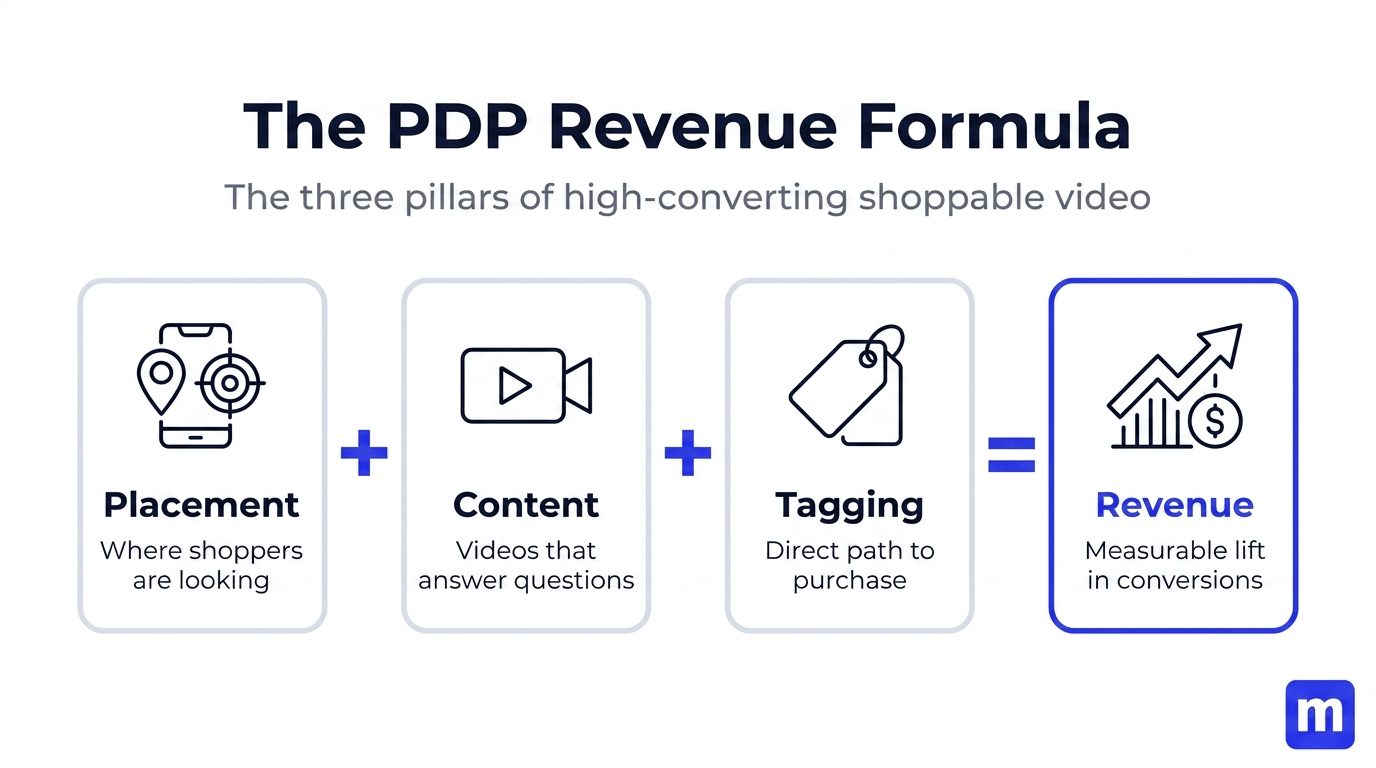
- The PDP Revenue Formula
- Step 1: Choose the Right Video Format
- Step 2: Source the Right Content
- Step 3: Place Video Where It Converts
- Step 4: Tag Products Properly
- Step 5: Measure What's Actually Moving Revenue
- Real Brand Results
- Common PDP Video Mistakes
- Frequently Asked Questions
Your product pages are doing most of the heavy lifting in your store. Here's how to make them work significantly harder — without changing your products, your prices, or your traffic.
Why PDPs Are Where the Real Revenue Battle Is Fought
Most Shopify merchants obsess over traffic. They optimise ad creative, improve their SEO, test their email sequences. All of that work funnels visitors to one place: the product detail page. And then, for the vast majority of stores, somewhere between 95% and 98% of those visitors leave without buying.
The industry average ecommerce conversion rate sits at around 2–3%. That means for every 100 people who land on your product page — people who searched for what you sell, clicked your ad, or found you through a recommendation — 97 of them leave empty-handed.
That's not a traffic problem. That's a product page problem.
The fix isn't more traffic. More traffic to a poorly converting PDP just means more people leaving. The fix is making your product pages better at converting the traffic you already have. And one of the most consistently impactful ways to do that — backed by data across dozens of Shopify brands — is shoppable video.
This post is specifically about PDPs: not homepages, not collection pages, not landing pages. Product detail pages, where the buying decision actually happens, and what you need to do to use shoppable video there in a way that actually moves revenue.
What Shoppable Video Actually Does to a Product Page

Before we get into tactics, it's worth being precise about the mechanism. Why does shoppable video lift PDP revenue? The answer isn't "because video is engaging" — it's more specific than that.
It answers the questions your photography can't. Static product photography is excellent at showing what something looks like in controlled conditions. It's limited at showing how something moves, how it fits on a real body, how the texture feels, how the product performs in actual use. For most physical products, those are the precise questions standing between a browser and a buyer.
A 20-second customer video of someone wearing your jacket in the rain, zipping it up, showing the hood — that answers the questions a flat lay never could.
It provides social proof at the moment of decision. The most powerful moment to show a customer testimonial isn't in a post-purchase email or on a dedicated reviews page — it's on the product page, right when a shopper is weighing whether to buy. A real customer talking about a product they love, visible on the product page itself, is a more compelling signal than any written review.
It shortens the path from consideration to purchase. With shoppable product tags embedded directly in the video, a shopper can move from watching to adding to cart without navigating away. Every extra step in the purchase journey costs conversions. Shoppable video removes several of those steps at once.
According to research from Wyzowl, 89% of consumers say watching a video has directly influenced a purchase decision. When that video is on the product page itself — with a product tag that makes buying immediate — the conversion pathway is about as short as it gets.
The PDP Revenue Formula: Placement + Content + Tagging
Before diving into the specific steps, here's the simple framework that determines whether shoppable video on your PDPs actually moves revenue:
- Placement — is it where shoppers are looking when they're close to buying?
- Content — is it the type of video that answers their remaining questions?
- Tagging — is there a product tag making the purchase immediate?
All three need to be right. A great video in the wrong place won't convert. The right placement with untagged video builds trust but doesn't drive add-to-carts. The right placement, right content, and a product tag working together — that's where the real results come from.
Step 1: Choose the Right Video Format for Your PDP
Different video widget formats perform differently on product pages. The format you choose determines how shoppers encounter and interact with your content.
- Stories-style pop-up: best for PDPs. A circular bubble on the product page that opens into a full-screen, vertical video experience when tapped — identical to Instagram Stories in interaction. This format is the highest-converting for PDPs because it's familiar, mobile-native, and opens in a way that feels intentional rather than autoplay-intrusive. Shoppers choose to engage. When they do, they're in an immersive experience with your product.
- Video carousel: strong on PDPs, great for variety. A horizontal row of videos that can be scrolled through. Works well when you have multiple testimonials or product demo videos and want shoppers to be able to browse. Less immersive than stories but more scannable — good for shoppers who want to quickly see several perspectives before deciding.
- Featured video: use sparingly on PDPs. A single large video placement — good for products with a strong hero story to tell. Best when you have one exceptional piece of content rather than multiple testimonials to show.
- Floating bubble: good for long PDPs. A persistent video icon that follows shoppers as they scroll. Useful for product pages with long descriptions where you want video accessible throughout the page — not just at the top.
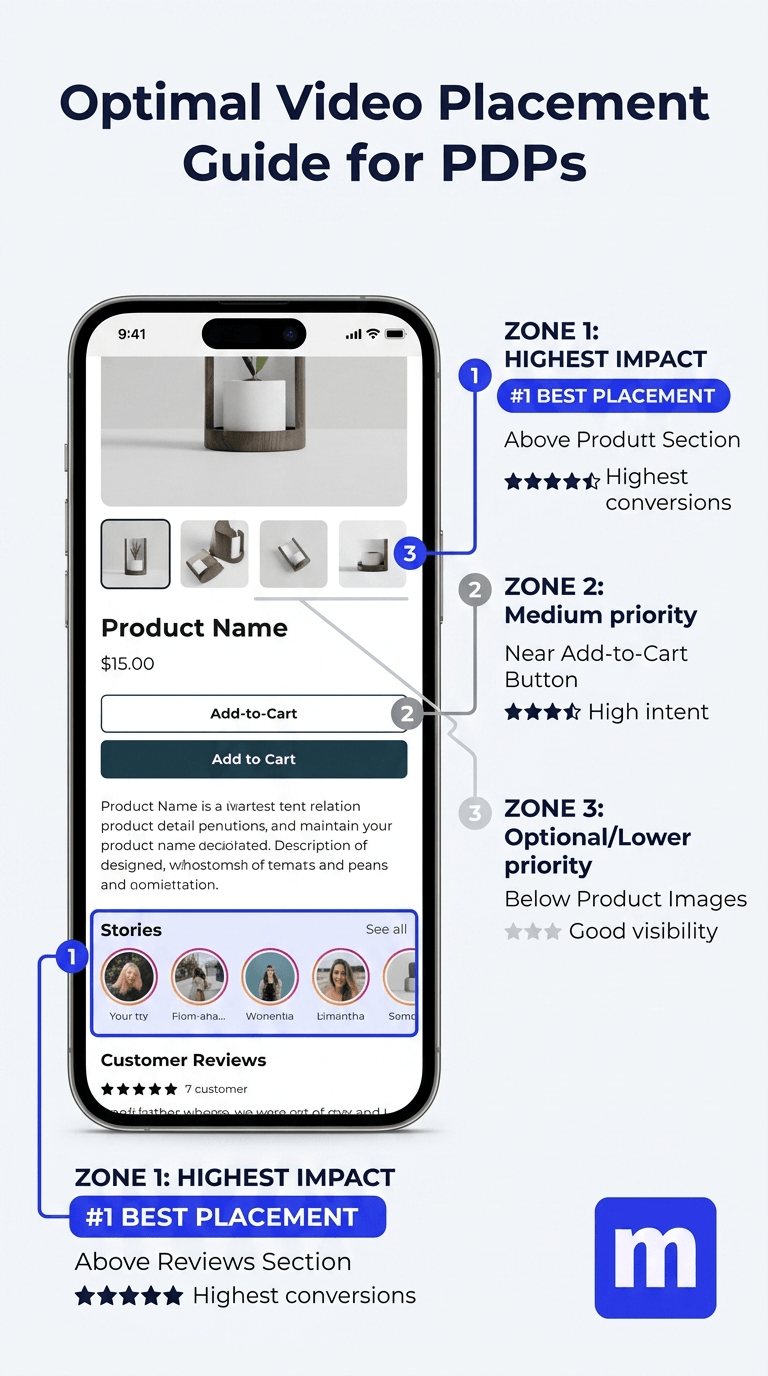
For most Shopify stores, the recommended approach is a stories-style pop-up or carousel placed above the reviews section. That placement consistently outperforms others because it catches shoppers at the exact moment they're looking for social proof — and gives them the most compelling form of it.
Step 2: Source the Right Content
The content you put in your PDP video widgets matters as much as the format. The wrong content in the right place will still underperform. Here's what works on product pages specifically:
- Customer testimonial videos. Real customers talking about real experiences with your product. This is the single highest-converting content type for PDP placement. It's authentic, specific, and provides exactly the social proof shoppers are looking for at that stage of the funnel. Research on UGC and consumer trust shows UGC is 9x more trusted than brand-produced content — and that gap is especially pronounced on product pages where shoppers are actively weighing a purchase. Try using our done-for-you Collect service to capture high-quality content from existing customers.
- TikTok and Instagram Reels featuring your products. If customers or creators have filmed videos using your products, those are gold for PDP placement. You can import TikTok and Instagram Reels directly into your Shopify store by pasting a URL, no downloading required.
- Product demos and how-to videos. Especially effective for products with a learning curve — beauty products, fitness equipment, technical apparel, kitchenware. A 30-second video showing how the product is used gives shoppers the confidence to buy that a photo never can.
- Before/after or transformation content. Highly effective for beauty, health, and wellness categories. Shows the product working in a tangible, before/after format that makes the benefit concrete.
What doesn't work as well on PDPs: overly polished brand films that feel like ads, lifestyle content where the product appears briefly without context, and generic videos that aren't specific to the product on that page.
Step 3: Place Video Where It Converts, Not Just Where It Fits
This is the step most merchants get wrong. They add a video widget wherever there's space on the page rather than where the data says it converts best.
- Above the reviews section: highest impact placement. This is the sweet spot. Shoppers who have scrolled past the product description and images are in active purchase consideration mode — they're looking for reasons to feel confident. ThruDark places their Moast shoppable video carousel directly above the reviews section on their PDPs and generated $5,854 in attributable sales in their first 30 days — from content they already had.
- Near the add-to-cart button: high intent placement. Placing a video widget near the buy button keeps video visible at the point of highest purchase intent. A story bubble sitting next to the add-to-cart button is a constant low-friction invitation to watch before buying.
- Below the fold but above reviews: strong for mobile. On mobile, the fold falls earlier and shoppers scroll more. A video widget placed partway down the page — below the initial product info but before the reviews section — catches mobile shoppers in their natural scrolling path.
One page, one test: pick your highest-traffic PDP, place a stories widget above the reviews section, and measure for four weeks. That single change is where the majority of the results in this post came from.
Step 4: Tag Products Properly — Every Time
An untagged video on a product page builds trust but doesn't directly drive add-to-carts. Product tags are what make shoppable video shoppable — they create the direct link between watching and buying that makes the format so effective.
- Tag during import to save time. When importing videos from TikTok or Instagram, you can tag products at the point of import rather than going back to edit each video afterward. For batch imports, this is significantly faster.
- Position tags when the product is most visible. In the video editor, place the product tag on the frame where the product is clearest and most prominent. A well-positioned tag that appears naturally feels less intrusive and gets more clicks than a tag slapped on a random frame.
- Tag multiple products when relevant. Lifestyle and creator content often features multiple products simultaneously. Tag each one. Each tag is a separate conversion opportunity for a different product.
- Verify tags before publishing. Before a video goes live on your PDP, tap each product tag and confirm it opens the correct product page and that add-to-cart works as expected. A broken tag is a broken conversion path.
Step 5: Measure What's Actually Moving Revenue
Adding shoppable video to your PDPs without measuring the impact is like running ads without looking at ROAS. Here's what to track and how to interpret it.
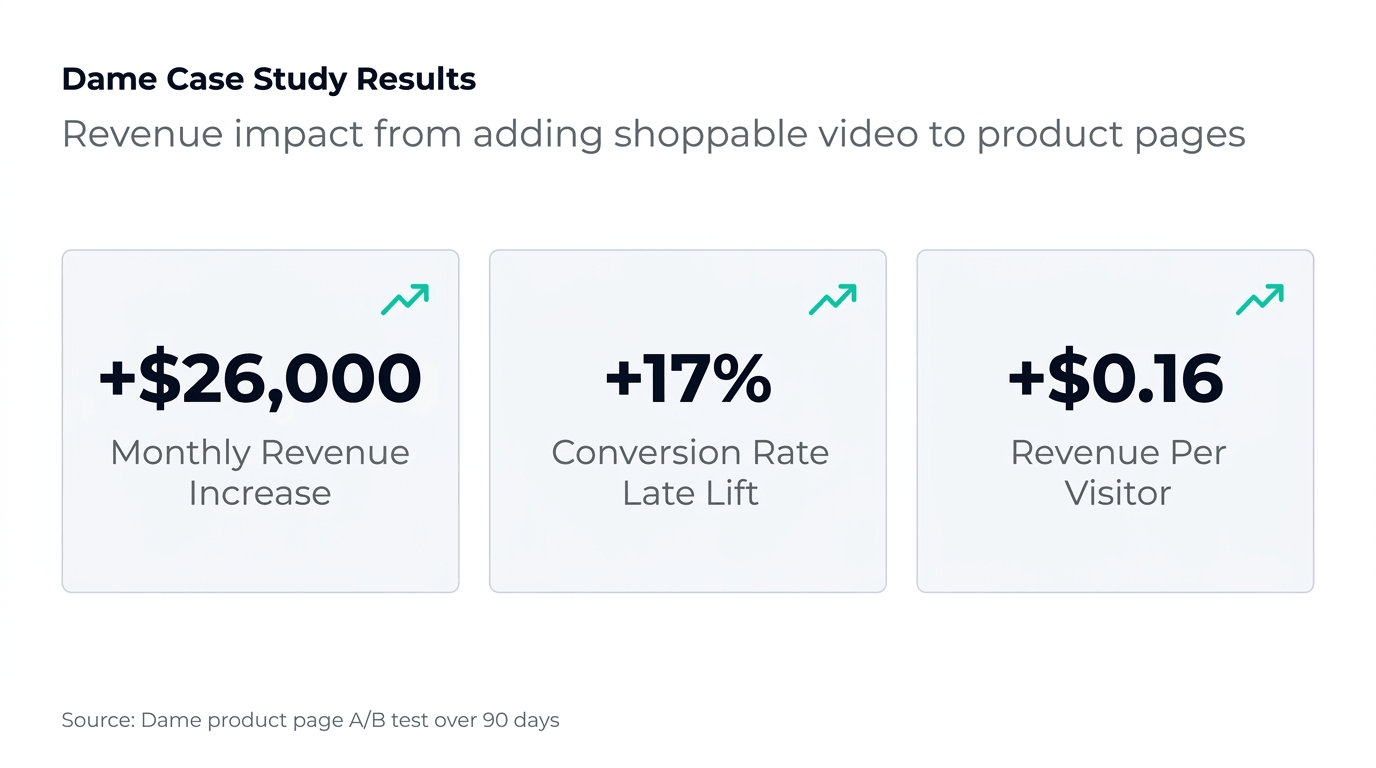
- Revenue per visitor (RPV) before and after. This is the cleanest signal. Take the revenue generated by a product page divided by the number of visitors over a given period, before and after adding the video widget. Dame's $0.16 lift in RPV is a real-world benchmark — same product, same traffic, higher revenue per visit because the page experience is more convincing.
- Conversion rate on the page. Has the percentage of visitors who add to cart or complete purchase increased? Set a 2–4 week baseline before adding video, then compare the same window after.
- Video views vs add-to-cart from video. Your shoppable video analytics should show you how many people watched, and of those, how many clicked a product tag. If views are high but tag clicks are low, either the tagging is poor or the content isn't connecting with buying intent.
- Revenue attributed to video. How much revenue can be directly traced to a product tag click that led to a purchase? This is the most direct measure of ROI.
Review these numbers monthly. Rotate in fresh content when performance plateaus — a carousel that performed well for six months will eventually lose impact as returning visitors have seen it before.
Real Brand Results: What PDP Shoppable Video Looks Like in Practice
Dame — $26,000 more per month from the same traffic. Dame added Moast shoppable videos to their product pages and tracked the impact carefully: a $26,000 increase in monthly revenue, a 17% lift in conversion rate, and a $0.16 improvement in revenue per visitor — without increasing traffic. The same visitors converting at a higher rate because the product pages gave them what they needed to feel confident buying.
ThruDark — $5,854 in 30 days from existing content. ThruDark makes premium performance apparel for people with high standards. They placed a Moast shoppable carousel above the reviews section on their PDPs using content they already had. Within 30 days: 293 videos live across their PDPs, 3,390+ monthly video views, and $5,854 in directly attributable sales.
The common thread: both brands started with content they already had. Neither needed a production budget or new shoots. The content already existed — it just needed to be in the right place, in the right format, with product tags that made buying immediate.
Common PDP Video Mistakes That Kill Conversion
- Putting video only on the homepage. Homepages are browsed; PDPs are where purchases happen. If your only video deployment is a homepage carousel, you're missing the highest-intent placement on your entire store.
- Using brand video instead of customer video on PDPs. On a product page, a polished brand film reads as an ad. A real customer's video reads as social proof. Brand video is great for homepages and landing pages — customer video is what converts on PDPs.
- Forgetting to tag products. A video without a product tag is content. A video with a product tag is a conversion tool. The extra 30 seconds it takes to tag a video correctly is some of the highest-ROI time you'll spend on your store.
- Placing video below the reviews section. If the video comes after the reviews, shoppers have already made their trust decision — you're too late. Put video where it informs the trust decision, not after.
- Too many videos of the same product in one widget. Three to six strong, well-tagged videos beat twenty mediocre ones. Shoppers will engage with the best content you have. Diluting it with average content lowers the overall quality signal.
- Not refreshing content. A returning customer who has seen the same five videos multiple times stops engaging with them. Refresh your PDP video library quarterly with new content.
Frequently Asked Questions
How much can shoppable video increase my Shopify PDP revenue?
Results vary by store, product, and execution, but Moast merchants see an average 17% lift in conversion rate from adding shoppable video to PDPs. Dame increased their monthly revenue by $26,000 and improved revenue per visitor by $0.16 — without increasing traffic.
What type of video works best on Shopify product pages?
Authentic customer testimonial video and real-world usage content consistently outperforms polished brand video on product pages. Short-form content (15–45 seconds) works best for mobile. Every video should have product tags. TikToks and Instagram Reels from customers or creators perform particularly well because they were made to share rather than to sell.
Where is the best place to put shoppable video on a product page?
Directly above the reviews section is the highest-converting placement for most stores. This is where shoppers look for social proof when they're close to buying. Near the add-to-cart button is also effective. Avoid placing video so far down the page that most shoppers never reach it.
Do I need to create new videos to get started?
No. Most merchants have existing content on TikTok and Instagram that can be imported directly in seconds. If customers have posted videos featuring your products, those are ready to be tagged and published. Five to ten well-tagged testimonial videos placed on your top-traffic PDPs is enough to start generating measurable results.
How do I know if shoppable video is actually increasing my PDP revenue?
Track revenue per visitor (RPV) and conversion rate on a page before and after adding video — with at least 2–4 weeks of data on each side. Your shoppable video analytics should also show views, product tag click-through rates, and add-to-carts attributed to video. If RPV goes up and video-attributed add-to-carts are positive, the video is working.
How many videos do I need on a product page?
Three to six well-chosen, well-tagged videos is the optimal range for most product pages. Enough to give shoppers variety and multiple angles on the product, not so many that the widget feels overwhelming or the quality is diluted.
Your product pages are the most valuable real estate in your store. Every visitor who lands there has already expressed intent — they searched, clicked, and arrived. Shoppable video is one of the most consistently effective ways to convert more of that intent into actual revenue.
The brands seeing the best results started simple: a handful of customer videos, above the reviews section, properly tagged. That single change — done well — is where $26,000 months and 17% conversion lifts come from.
Get started with Moast for free
Related reading: Does shoppable video actually increase conversions? · How to add video testimonials to your Shopify product pages · How to import TikTok and Instagram Reels into Shopify
October 12, 2026
Related content


Turn your social content into a revenue channel
Turn your TikToks and Reels into shoppable videos and boost conversions by 3.5x.