





Publish your shoppable videos to the Shop app for free

Add your Moast shoppable videos to the Shop app and get discovered by millions of high-intent shoppers.

Brands with videos sell more on Shop

Leading Shopify brands are adding shoppable videos to their Shop Store Homepage and PDPs to boost conversions and engagement.

3× Longer engagement

Shoppers spend more time watching your videos.

20× more product discovery

Customers explore significantly more products.

1.5× higher conversions

Video viewers convert at higher rates.

Publish existing videos in one click

Instantly publish your Moast videos to the Shop app as shoppable videos. Automatically tagged and synced with your products. No manual uploads. No extra tools. Just one click to go live.
"Moast increased our conversion rates by 17%, proving the impact of showcasing content from customers."
Smiling young professional in white polo shirt against teal background
Growth Product Manager, Cradlewise

Frequently asked questions

Answers to the most common questions about the Shop app.
What are Shop videos?

Shop Videos are shoppable video feeds that appear on your Shop Store homepage and product pages. They allow you to display UGC, product demos, and creator content directly inside the Shop app, where millions of shoppers discover new brands every day.

Is Moast's Shop App integration free?

Yes. Adding shoppable videos to your Shop Store through Moast is completely free. There are no hidden fees or usage limits for Shop Videos. Setup takes about 5 minutes and is available on the Moast Free plan.

Where do my videos appear in the Shop app?

- On the Shop app home feed: Your shoppable videos can appear in the main Shop feed, helping shoppers discover new brands and products through video.

- On your Shop Store page: Videos show on your brand’s Shop storefront to increase engagement and product discovery. Many brands place them just below the hero for more visibility.

- On your Shop PDPs: Product-specific videos appear on your product pages so shoppers can see items in action. Adding video to PDPs can improve conversion rates in the Shop app.

How do I add videos to my Shop store?

Setup takes about 5 minutes with four simple steps:

1. Add the Moast app to your Shopify store.
2. Add videos to Moast by importing them from Instagram, TikTok, or uploading your own.
3. Tag products to your videos.
4. Turn on the Shop app toggle to publish your videos. That’s it. They go live on your Shop Store.

Learn more about Moast's integration with Shop.

Who is eligibile for Shop videos?

Shop is designed for Shopify merchants. Once eligible, merchants are automatically opted into selling on Shop. You can review eligibility requirements through Shopify and manage how you appear in the Shop app via the Shop channel in your Shopify admin.


Get discovered by millions on the Shop app

Publish shoppable videos to your Shop Store in minutes and let millions of shoppers discover your products through video.

✨ AI Smart Feeds that sort your videos for higher conversions

Stop guessing which videos to show first. Moast Smart Feeds automatically sorts your videos based on real shopper behavior like clicks, watch time, add-to-carts, and sales so shoppers always see the videos that convert best.
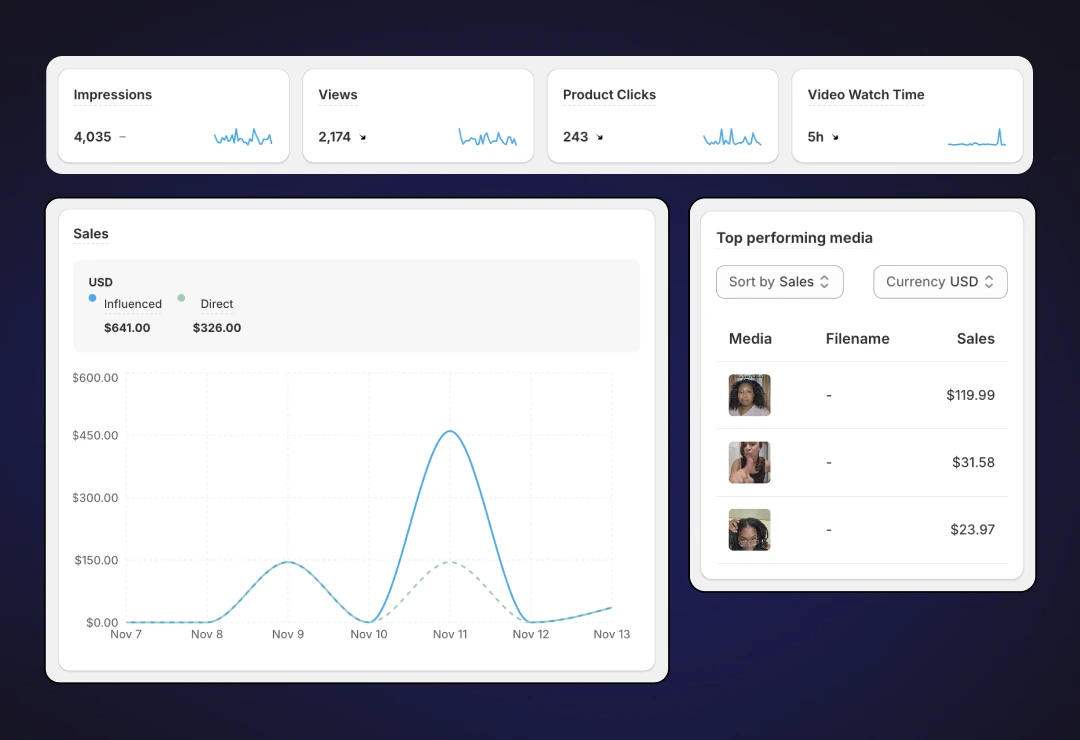
Sales dashboard showing impressions, views, clicks, and sales metrics