

- The Shopify Conversion Rate Problem
- What Video Actually Does to Conversion Rate
- The 5 Video Types That Move Shopify Conversion Rate
- Where to Place Video for Maximum Conversion Impact
- How to Make Video Shoppable
- Video and Mobile Conversion
- How Video Reduces Returns
- Real Shopify Brand Results from Video
- How to Measure the Impact of Video
- Common Video Mistakes That Limit Conversion
- Getting Started: The Fastest Path from Zero to Results
- Frequently Asked Questions
The average Shopify store converts at 1.4%. The top 10% convert at 4.7% or higher. Video is one of the most consistently documented ways to close that gap — here's exactly how.
The Shopify Conversion Rate Problem
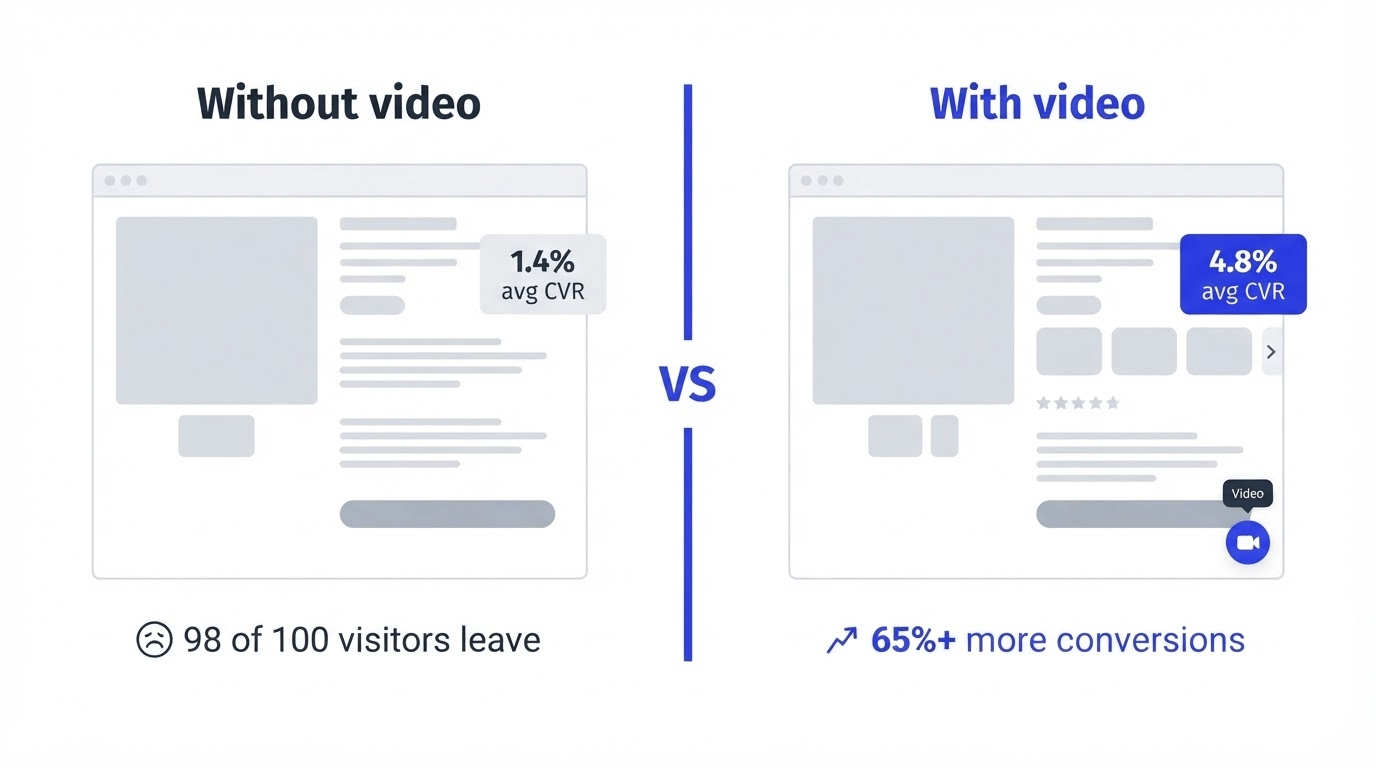
Here's the uncomfortable arithmetic of ecommerce. The average Shopify store converts at 1.4% — meaning for every 100 people who visit your store, 98 or 99 leave without buying. Stores above 3.2% are in the top 20%, and stores above 4.7% are in the top 10%.
The math of what that gap represents in real revenue is striking. If your store gets 50,000 monthly sessions with an average order value of $80, the difference between converting at 1.4% and 3.2% is:
- At 1.4%: 700 orders × $80 = $56,000/month
- At 3.2%: 1,600 orders × $80 = $128,000/month
That's $72,000 more per month from the exact same traffic. Not from buying more ads. Not from acquiring new customers. From converting the shoppers who are already there.
Most conversion rate optimization advice focuses on the same variables: page speed, checkout friction, trust badges, pricing. These all matter. But there's one lever that's both among the most impactful and most underused on Shopify stores: video.
What Video Actually Does to Conversion Rate — The Data
Before getting tactical, it's worth grounding in what the research actually shows. The evidence for video's impact on conversion is substantial and consistent across multiple sources.
Websites with video achieve an average conversion rate of 4.8%, while websites without video sit at just 2.9% — an uplift of over 65%. The add-to-cart effect is even more pronounced: the likelihood of adding a product to cart increases by 144% after watching a product video.
Product pages with videos experience a 47% higher engagement rate compared to those without. Shoppers spend 2x more time on PDPs with videos compared to static image pages. More time on page correlates directly with higher conversion — shoppers who spend longer on a product page have more opportunity to address their remaining objections before leaving.
62% of consumers watch product review videos before making a purchase, and 84% of consumers say they were convinced to buy a product or service after watching a brand's video.
For shoppable video specifically — where the video includes embedded product tags that let shoppers add to cart directly — the impact compounds. Moast merchants see an average 17% lift in conversion rate after adding shoppable video to their product pages. Dame, a wellness brand, increased monthly revenue by $26,000 after moving existing social video to their PDPs. ThruDark generated $5,854 in attributable sales in their first 30 days using a shoppable video carousel above the reviews section on their product pages.
Why does video work so well? Three mechanisms, not just one:
- It answers the questions that static content can't. A product photo shows what something looks like. A product video shows how it moves, how it fits on a real body, how it applies to skin, how it holds up under use. These are precisely the questions standing between a browser and a buyer across almost every product category.
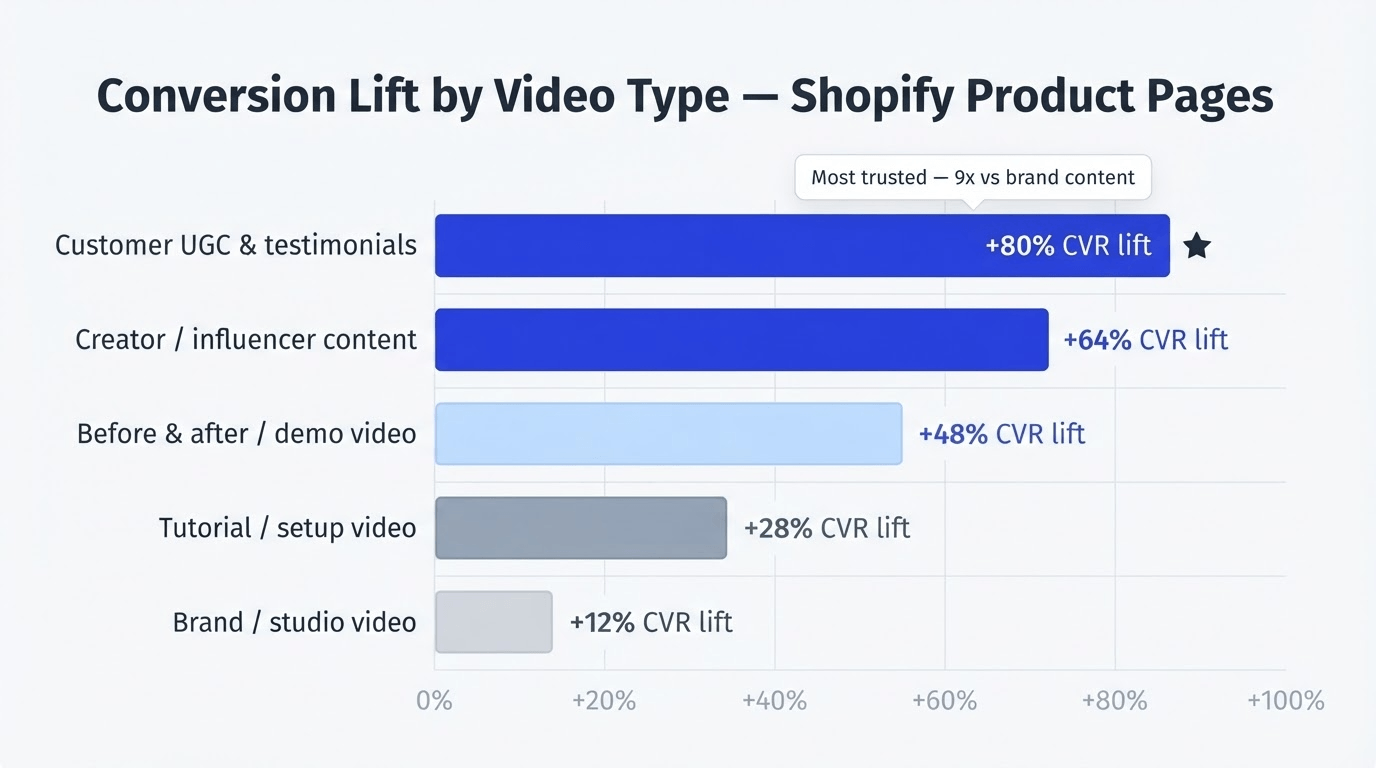
- It builds trust through authenticity. 64% of shoppers are more likely to complete a purchase after watching a product video. When that video features real customers rather than branded content — UGC, creator video, customer testimonials — the trust effect is amplified further. UGC is consistently rated 9x more trusted than brand-produced content.
- It shortens the purchase path. Shoppable video with product tags removes steps from the buying journey. Instead of watching video on social then navigating to a website to find and add a product to cart, it becomes: watch video on product page, tap tag, add to cart. Every removed step reduces the probability of abandonment.
The 5 Video Types That Move Shopify Conversion Rate
Not all video is equal. The type of video you use determines how much conversion lift you get. Here's what the data and merchant experience consistently show, ranked by conversion impact on PDPs:
1. Customer UGC and Testimonial Video
Real customers talking about real experiences with your product. This is the highest-converting video type for product page placement because it's authentic, specific, and provides exactly the social proof shoppers are looking for at the decision stage.
Displaying UGC content on your product page increases conversions by 28%, and including video testimonials can increase conversion rate by 80%. The trust premium of UGC is real: 77% of shoppers would like to see other customers' photos rather than professional shots before making a purchase decision. That preference for real-person content is even more pronounced in video than in photography.
Best placement: Above the reviews section on PDPs. This is where shoppers look for peer validation right before deciding, and UGC video answers that need more powerfully than any other format.
2. Product Demo and How-It-Works Video
Video showing a product being used in real conditions — how it's worn, how it operates, what it feels like in use. This is most important for products with a learning curve, a technical function, or a physical characteristic that photography can't convey.
74% of people who watch an explainer video have subsequently bought the product. For technical products especially, a clear demonstration video resolves the specific objection that creates hesitation at the point it matters most.
Best placement: Near the add-to-cart button on the product page.
3. Creator and Influencer Content
TikToks and Instagram Reels from creators featuring your products. This content was made to be watched — it's engaging by design and authentic by nature, made by someone with no financial incentive to be positive. When placed on a product page, it performs exceptionally well because shoppers recognise the format and trust the source.
Creator content also removes the content creation burden from the brand. Rather than producing video, you're importing it — paste a URL and it's in your library in seconds.
Best placement: In a carousel above reviews on PDPs; on the homepage for brand-building; on collection pages for discovery.
4. Before-and-After and Transformation Content
Particularly powerful for beauty, skincare, health, fitness, and home products — anything where the product is meant to produce a visible change. A 30-second before-and-after video showing a real customer's result makes the product benefit concrete in a way that a written claim never can.
Product pages with video saw up to a 65% increase in conversion rates compared to those with images alone — and before-and-after content is consistently the highest-performing video type in categories where transformation is the core value proposition.
Best placement: Above reviews on PDPs for the specific product being shown; on collection pages for the category.
5. Setup, Onboarding, and Tutorial Video
For complex, technical, or premium products, a step-by-step setup video serves two purposes: it helps shoppers feel confident that the product won't be overwhelming, and it helps customers who have already purchased use the product successfully — reducing support burden.
Fellow, a premium coffee gear brand, replaced their static PDF manuals with a step-by-step interactive carousel built in Moast. The result was reduced post-purchase friction, fewer support queries, and a buying experience that matched the premium nature of the product.
Best placement: Dedicated learning page accessible from product pages; carousel near the bottom of the PDP for technical products.
Where to Place Video for Maximum Conversion Impact
Where video lives on your store matters as much as what the video shows. The same content performs very differently depending on placement. Here's the priority order based on consistent merchant results:
- Above the reviews section on PDPs — highest converting. This is the single most impactful placement for shoppable video across every product category. Shoppers who have scrolled past the product description and images are in active purchase consideration — they're looking for reasons to feel confident. ThruDark placed their shoppable video carousel above the reviews section and generated $5,854 in attributable sales in 30 days. LNDR uses this placement with their 3-video rule across every PDP and reached 100,000+ video views in their first few weeks.
- Near the add-to-cart button — high-intent placement. A floating video bubble or small stories widget near the buy button keeps video accessible at the highest-intent moment — when a shopper is actively considering whether to commit.
- Homepage — brand and discovery placement. A video carousel on the homepage signals immediately to new visitors that real people use and love your products. Product videos increase time on site by up to 88% — and homepage video that keeps visitors engaged longer gives your other pages more opportunity to convert.
- Collection pages — discovery placement. Video on collection pages helps shoppers discover products within a range before committing to a specific PDP. Haul content, styling videos, and UGC showing multiple products from a collection work particularly well here.
- Post-purchase and support pages — retention placement. Tutorial and setup video placed on a dedicated learning page accessible after purchase reduces support queries, improves product satisfaction, and increases the probability of repeat purchase.

How to Make Video Shoppable — and Why It Matters
A video on your product page builds trust. A shoppable video with product tags converts that trust into revenue.
The difference is the product tag — a small interactive element embedded in the video that lets a shopper tap to view a product or add to cart without leaving the video. With shoppable video, shoppers go from watching to adding to cart in one tap, every product shown in the video has a direct path to purchase, and multi-product content creates multiple conversion opportunities per view.
How to tag products in your videos:
- In your Moast media library, open any imported or uploaded video
- Click Add product tag
- Search for the product by name or Shopify handle
- Position the tag on the frame where the product is most clearly visible
- Save — the tag is live
Tag every video before publishing. An untagged video is content; a tagged video is a conversion tool. If you're importing a batch of TikToks or Reels, tag products during the import step to save time rather than editing each video afterward. Tag multiple products in a single video wherever relevant — each tag is a separate conversion opportunity.
Video and Mobile Conversion: The Biggest Opportunity on Shopify
Mobile traffic dominates Shopify. Mobile devices account for approximately 79% of total traffic to Shopify stores. The average mobile conversion rate is 1.2%, while desktop conversion rates stand at 1.9%.
That gap — mobile driving nearly 80% of traffic but converting at roughly 60% of the desktop rate — is the single largest source of recoverable conversion loss for most Shopify stores. And video is one of the most effective tools for closing it: mobile shoppers consume video more naturally than they read text.
78% of people say they'd most like to learn about a product or service by watching a short video, compared to just 9% who prefer text-based articles. On a 375px screen, a paragraph of product description is harder to parse than a 20-second video showing the product in use.
Mobile video best practices for Shopify:
- Use vertical format (9:16 ratio) — it fills the mobile screen naturally
- Keep videos short — 15–45 seconds works best on PDPs
- Position floating video bubbles away from the add-to-cart button so they don't obstruct the primary CTA
- Test on actual mobile devices before publishing
- Verify page speed after adding video — Moast's total page load is 0.85MB, essentially zero impact, but poorly optimised video apps can significantly hurt mobile performance
For every 32 milliseconds slower a store responds to interactions, conversion tends to drop by about 1.5%. App choice matters: a video widget that improves trust but slows your store can cost you more in conversion rate than it gains.
How Video Reduces Returns — and Why That Matters for Revenue
Conversion rate optimisation is usually focused on getting more people to buy. But video also affects a metric that's equally important to profitability: return rate.
Explainer videos can reduce product returns by 35% by setting accurate expectations upfront. The mechanism is straightforward: returns happen when the physical product doesn't match what the shopper expected. Static photography consistently creates this gap — the product in perfect studio conditions looks different from the product worn in real life, under real lighting, on a real body. Video that shows the product in authentic conditions closes that expectation gap before the purchase, not after.
For apparel brands specifically, the average return rate for online fashion purchases is 24%. Videos showcasing products from multiple angles and on models of varying body types can reduce return rates by 12–18%.
Applying that to the earlier revenue example: if your store does $56,000/month in revenue at a 24% return rate, you're effectively losing $13,440/month to returns. A 15% reduction in return rate from adding product video saves over $2,000 per month — before accounting for any conversion rate improvement.
Real Shopify Brand Results from Video
Dame — $26,000 more per month without new content or new traffic. Dame added existing social video to their product pages using Moast. Result: a $26,000 increase in monthly revenue, a 17% lift in conversion rate, and a $0.16 improvement in revenue per visitor.
ThruDark — $5,854 in 30 days from a strategic placement decision. ThruDark placed a shoppable video carousel directly above the reviews section on their product pages using content they already had. The placement decision drove 3,390+ monthly video views and $5,854 in attributable sales in their first month.
LNDR — 100,000+ video views with a scalable system. LNDR developed a three-video rule across all their PDPs: UGC clip, testimonial, product in action. Using Moast's custom feeds, this runs automatically as new products are added. Result: 393 videos across product pages, 100,000+ views in the first few weeks, 50+ direct sales attributed to video.
ENDU — €38,000 more per month from the same traffic. ENDU, a European fitness brand, added shoppable video reviews to their product pages. With the same 100,000 monthly visitors, revenue increased from €307,000 to €345,000 per month — a €38,000 lift without any increase in traffic or ad spend.
Par x Design — 30,000 video views in month one with a reviews integration. Par x Design activated Moast's integration with Junip to display star ratings directly alongside shoppable video on product pages. Result: 30,000 video views in their first month.
How to Measure the Impact of Video on Your Conversion Rate
Adding video without measuring the impact is like running ads without tracking ROAS. Here's how to attribute results accurately:
- Set a baseline first. Before adding any video, record your product page conversion rate, revenue per visitor (RPV), and add-to-cart rate for a minimum of 2 weeks — ideally 4 weeks.
- Track at the page level, not the store level. A small conversion rate improvement on a high-traffic product page will be invisible in sitewide analytics but very visible when you look at that specific page.
- Revenue per visitor (RPV) is the cleanest signal. RPV captures both conversion rate and average order value changes in one number. Dame's $0.16 improvement in RPV is the kind of figure to track.
- What your shoppable video analytics should show you: total video views per widget and per video, product tag click-through rate, add-to-carts attributed to video, and revenue attributed to video.
If views are high but tag clicks are low, the issue is tagging — wrong position, wrong frame, or content not connected to purchase intent. If views are low, the issue is placement — the widget isn't being seen. Review monthly and rotate content when performance plateaus.
Common Video Mistakes That Limit Conversion
- Using only brand-produced video on product pages. Polished brand video builds awareness; customer video builds trust. On a product page, trust is what converts. Mix branded content with UGC, creator video, and customer testimonials.
- Putting video only on the homepage. The homepage is where people browse. Product pages are where people buy. Your highest-traffic product pages need video first.
- Not tagging products in videos. An untagged shoppable video widget generates views but not add-to-carts. Every video needs at least one product tag before it's published.
- Placing video below the reviews section. By the time shoppers reach below the reviews section, they've already made their social proof decision. Above reviews, always.
- Adding video apps that slow your store. Conversion rates drop by 0.3% for every additional second of load time. Choose apps with a demonstrably small page footprint and verify with Google PageSpeed Insights before and after installing any video app.
- Using one video format across all placements. Match the video type to the moment: UGC above reviews for purchase decisions, demo video near add-to-cart for hesitant buyers, lifestyle content on the homepage for new visitors.
- Not refreshing content. Returning visitors who see the same five videos every time eventually stop engaging. Social Sync pulls in new content automatically.
Getting Started: The Fastest Path from Zero to Results
Most merchants who start seeing conversion rate improvements from video follow the same sequence:
- Week 1: Audit and import. Search TikTok and Instagram for posts that have tagged your brand handle or used a branded hashtag. Use Import by Profile Mentions to surface content you may not have seen. Tag products in every video you import.
- Week 1: Deploy on your top product pages. Install a Moast stories widget or video carousel above the reviews section on your three highest-traffic product pages.
- Week 2: Set up Social Sync. Connect your TikTok and Instagram accounts and activate Social Sync to automatically import new content every 24 hours.
- Week 3–4: Collect new UGC. Set up a Moast Collect widget on your store to start gathering customer-submitted video. Post-purchase emails sent 1–2 weeks after delivery with a small incentive consistently generate strong submission rates.
- Month 2: Measure and expand. Compare your product page conversion rate and RPV against your baseline. Expand video to your next tier of product pages. Rotate content based on what your analytics show performing.
The time from zero to having shoppable video on your highest-traffic product pages is under 30 minutes for most merchants. The results compound over time as your content library grows and more product pages have video deployed.
Frequently Asked Questions
How much does video increase conversion rate on Shopify?
The impact varies by category, placement, and content type, but the data is consistent: websites with video convert at 4.8% on average versus 2.9% without — an uplift of over 65%. Moast merchants specifically see an average 17% lift in conversion rate after adding shoppable video to their product pages. Dame increased monthly revenue by $26,000 after adding existing social video to their PDPs.
What type of video converts best on Shopify product pages?
Authentic customer UGC and testimonial video consistently outperforms polished brand video on product pages. The trust premium of real customer content is significant — shoppers on a product page are looking for social proof, and UGC provides it more convincingly than any marketing video. Short-form vertical content (15–45 seconds) works best on mobile, which accounts for roughly 79% of Shopify traffic.
Where should I put video on my Shopify product pages?
Above the reviews section is the highest-converting placement for shoppable video on PDPs. This is where shoppers look for social proof right before deciding. Near the add-to-cart button is the second most effective placement. Avoid placing video so far down the page that most shoppers never reach it.
Does adding video slow down my Shopify store?
It depends entirely on the app. Poorly optimised video embeds can significantly hurt your page speed and conversion rate — conversion rates drop by 0.3% for every additional second of load time. Moast is engineered to have minimal impact: total page load is just 0.85MB. Always run a Google PageSpeed Insights test before and after adding any video widget.
How do I get video content for my product pages?
Start by searching for existing content: TikTok and Instagram posts that have tagged your brand, creator videos featuring your products, and customer-submitted photos and videos. With Moast, you can import any public TikTok or Instagram Reel by pasting a URL. Import by Profile Mentions surfaces posts that tagged your handle. Once existing content is imported, set up Moast Collect to gather new customer video on an ongoing basis and Social Sync to automatically import new social content.
How long does it take to see results?
Most merchants start seeing measurable impact within 2–4 weeks of deploying shoppable video on their top product pages. ThruDark saw $5,854 in attributable sales in the first 30 days. Par x Design hit 30,000 video views in their first month. The key is starting with your highest-traffic pages — that's where the same percentage improvement translates to the most revenue.
The gap between where your Shopify store converts today and where the top 10% of stores convert isn't primarily a traffic problem. It's a product page problem. Video gives shoppers what they need: the product in motion, on real people, in real conditions, with a tag that lets them buy immediately.
Start with what you already have. Import your social content. Place it above the reviews section on your best pages. Tag every product. Measure for four weeks.
Get started with Moast for free
Related reading: Shoppable video examples: 10 Shopify brands doing it right · How to increase Shopify PDP revenue with shoppable video · Does shoppable video actually increase conversions?
October 12, 2026
Related content
.jpg)
.jpg)
.jpg)
Turn your social content into a revenue channel
Turn your TikToks and Reels into shoppable videos and boost conversions by 3.5x.