


- What UGC Video Actually Is
- Why UGC Video Drives More Shopify Sales
- Step 1: Audit the UGC You Already Have
- Step 2: Import Existing UGC From TikTok and Instagram
- Step 3: Set Up an Ongoing Collection System
- Step 4: Make Every Piece of UGC Shoppable
- Step 5: Place UGC Where It Actually Converts
- Step 6: Keep Your UGC Library Fresh Automatically
- Incentives That Actually Get Customers to Submit Content
- Real Brand Results From UGC Video
- Common Mistakes That Limit UGC Performance
- Frequently Asked Questions
Your customers are already creating the content that sells your products. Here's how to find it, collect more of it, and put it to work on your store.
What UGC Video Actually Is (And Why It Outperforms Brand Content)
UGC — user-generated content — is any photo or video created by a real customer or independent creator, rather than by your brand's marketing team. A customer's unboxing video. A creator's honest product review. A parent's stroller demo filmed in their living room. None of it is scripted, produced, or paid for in the traditional sense. That's exactly what makes it work.
Shoppers have become extremely good at recognizing brand marketing, and extremely skeptical of it. A polished studio video signals effort, but it also signals control — the brand chose every frame, every word, every angle. UGC signals the opposite: an unfiltered, unpaid opinion from someone with nothing to gain. Research on consumer trust consistently shows that people find user-generated content significantly more credible than brand-produced content — a trust gap that shows up directly in conversion data.
The shift in ecommerce over the last several years has been the move from "look how good our product looks" to "look how real people actually use it." UGC video is the format that captures that second message — and it's sitting, mostly unused, in your customers' phones and your brand's social mentions right now.
Why UGC Video Drives More Shopify Sales Than Produced Content
The case for UGC isn't just about trust — it's about how it changes behavior at every stage of the purchase funnel.
It answers questions static content can't. A photo shows what a product looks like. UGC video shows how it's actually used — how a skincare product applies, how a jacket fits on a real body, how a stroller folds in a tight hallway. Those are the exact questions that create hesitation right before a purchase decision.
It performs better on product pages specifically. According to Wyzowl's research, 89% of consumers say a video has directly influenced a purchase decision. When that video is UGC placed on a product page — at the exact moment a shopper is deciding — the effect compounds. Moast merchants see an average 17% lift in conversion rate after adding shoppable UGC video to their PDPs.
It scales without a production budget. Brand video requires a shoot, a script, a budget, and a timeline. UGC already exists. Your customers and the creators who've featured your products are producing content constantly — the work isn't creating it, it's finding it, collecting it, and putting it in the right place.
It compounds over time. A single brand video campaign has a shelf life. A UGC collection system — one that pulls in new content automatically — gets stronger every month as more customers buy, use, and share. The asset appreciates rather than depreciates.
Step 1: Audit the UGC You Already Have
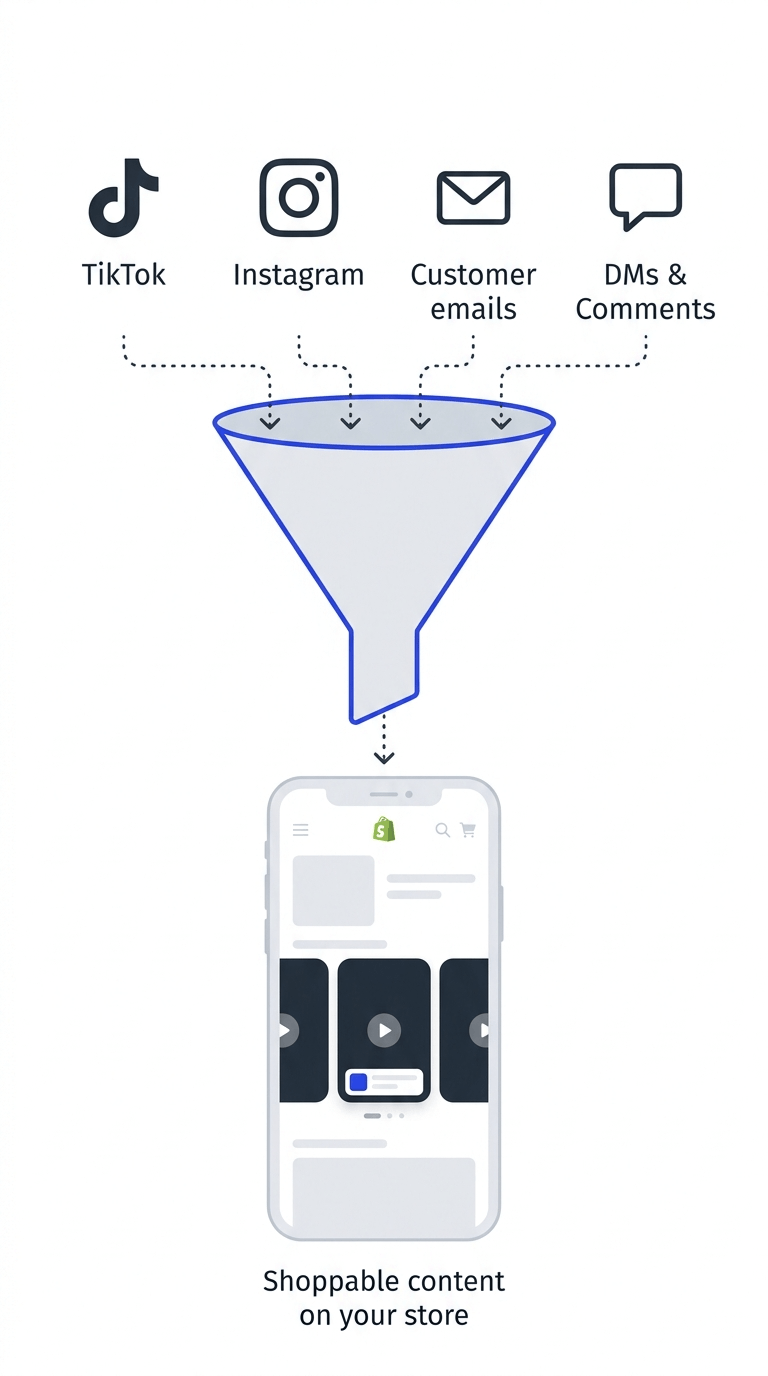
Before building anything new, find out what already exists. Most brands are sitting on far more usable UGC than they realize — it's just scattered across platforms instead of centralized.
Check these sources:
- Your own social mentions. Search Instagram and TikTok for posts that have tagged your brand handle or used your branded hashtag. Most brands discover content they never knew existed this way.
- Customer emails and reviews. Customers occasionally attach photos or videos directly in support emails or review submissions. These rarely make it onto product pages, but they're often some of the most authentic content available.
- Influencer and creator partnerships. If you've ever run a gifting campaign or worked with creators, that content is likely still live on their channels — and importable directly to your store.
- DMs and comments. Customers regularly send brands unsolicited content through direct messages, simply because they're excited about the product. This content is easy to miss if no one is specifically looking for it.
Spend an hour doing this audit before moving to the next step. It's common for brands to find dozens of usable videos they didn't know they had.
Step 2: Import Existing UGC From TikTok and Instagram
Once you know what's out there, get it into your Shopify store. With a tool like Moast, this takes minutes rather than the hours it would take to manually download and re-upload content.
- Import by specific URL. If you know exactly which post you want, paste the link directly. The video imports in seconds — no downloading required.
- Import by profile mentions. This surfaces posts where other accounts have tagged or mentioned your brand handle — often revealing UGC you had no idea existed. You can pull in up to 48 posts at once using this method.
- Import by hashtag. If you have a branded or community hashtag, this method finds every post using it, giving you a fast way to build a sizeable UGC library from content your customers have already created.
- Import by browsing a profile. Paste any public profile URL — your own, a creator's, a customer's — and select specific posts from their feed.
For the complete walkthrough on importing from each platform, see our guide to importing TikTok and Instagram Reels into Shopify.
Step 3: Set Up an Ongoing Collection System
Importing existing content gets you started. But the brands seeing the biggest long-term gains from UGC build a system that keeps generating new content without manual effort.
- Use a dedicated collection widget. Tools like Moast Collect let you add an upload widget to any page on your store. Customers enter their email and submit a photo or video directly — no app download, no friction.
- Place it where customers are already engaged. Post-purchase confirmation pages, order tracking pages, and follow-up emails sent a week or two after delivery are the highest-converting placements for content requests.
- Automate the follow-through. Connect your collection widget to Shopify Flow so that when a customer submits content, you can automatically tag them, send a thank-you, or trigger a reward — without manual tracking.
- Review and approve. Submissions typically land in a pending queue for review before going live. This keeps quality consistent without slowing down the flow of new content arriving.
If managing this process isn't something your team has time for, Moast Collect also offers a done-for-you service — identifying your best customers, reaching out on your behalf, and building a curated UGC library without requiring any of your team's time.
Step 4: Make Every Piece of UGC Shoppable
This is the step that turns UGC from a trust-building asset into a direct revenue driver. A UGC video without a product tag is content. A UGC video with a product tag is a conversion tool.
- Tag the product clearly. In your video editor, add a product tag on the frame where the item is most visible. Search by product name or handle, position the tag, and save.
- Tag multiple products if relevant. Haul videos, styling content, and lifestyle UGC often feature more than one item. Tag each one separately so shoppers can click through to whichever product interests them.
- Tag during import to save time. If you're importing a batch of UGC at once, tag products as part of that import flow rather than going back to edit each video individually afterward.
- Position tags naturally. A tag that appears when the product is clearly visible and central to the frame gets tapped more often than one that feels randomly placed.
Step 5: Place UGC Where It Actually Converts
Where you put UGC on your store matters as much as the content itself. The same video performs very differently depending on placement.
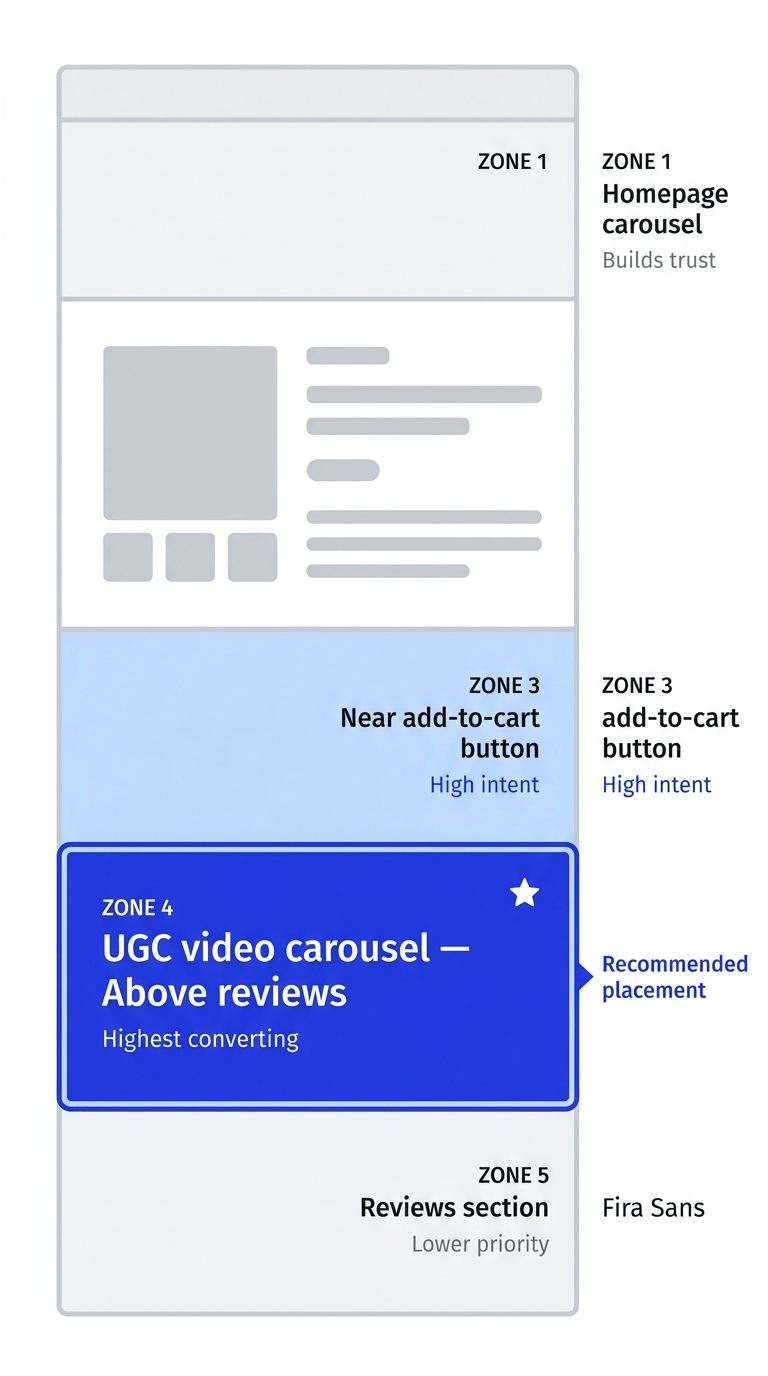
- Above the reviews section on PDPs: the highest-converting spot. This is where shoppers look for social proof right before deciding to buy. UGC placed here directly answers the question "is this worth it?" at the precise moment that question is being asked.
- Near the add-to-cart button. A floating widget or small carousel near the buy button keeps UGC visible without competing with the main product images.
- On collection pages. UGC showing multiple products in use — haul videos, styling content — helps shoppers discover items they didn't already have in mind.
- On the homepage. A UGC carousel builds immediate trust for new visitors and sets a tone of authenticity before they've even reached a specific product.
For a deeper breakdown of conversion-optimized placement, see our guide on how to increase Shopify PDP revenue with shoppable video.
Step 6: Keep Your UGC Library Fresh Automatically
A UGC strategy that requires constant manual maintenance eventually stalls. The brands getting consistent value from UGC set up systems that keep working without ongoing effort.
Social Sync automatically imports new content from connected TikTok and Instagram accounts every 24 hours. You can sync your own profile, posts that mention your handle, or posts using a specific hashtag — so new UGC lands in your library the day after it's posted, with zero manual work.
Auto-approve settings let trusted sources flow directly into your widgets without manual review, while content from new or unverified sources can stay in a pending queue.
Rotation reminders. Even with automation pulling in new content, periodically review your top-performing widgets and refresh them. Returning visitors who've seen the same content multiple times engage with it less each time.
Incentives That Actually Get Customers to Submit Content
Most customers who love a product are happy to share it — they just need a low-friction way to do so and a small reason to take the extra step. Here's what works:
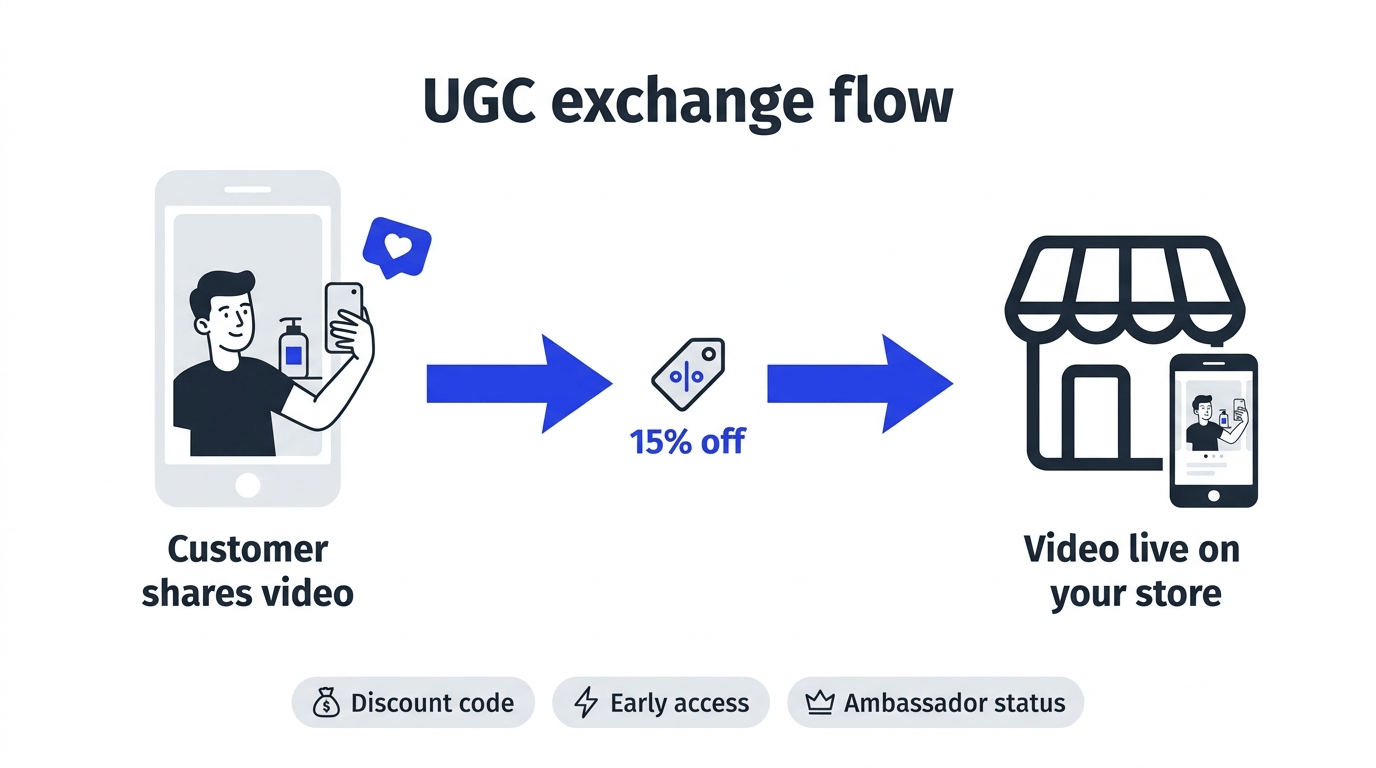
- Discount codes. Offering 10–15% off a future order in exchange for a video submission is the most common and effective incentive across categories — particularly in beauty, food, and fitness.
- Recognition and community status. For categories with passionate communities — outdoor gear, baby products, home goods — being featured as a brand ambassador or having content shown to thousands of future customers is often motivation enough on its own.
- Early access. Offering early access to new products or restocks in exchange for content works particularly well with repeat customers who are already engaged with the brand.
- Simple asking. Don't underestimate a straightforward, well-timed request. A follow-up email a week or two after delivery — once the customer has had time to actually use the product — with a simple "would you share how it's going?" converts better than most brands expect.
Real Brand Results From UGC Video
Mockingbird — 140+ parents converted into brand ambassadors. Mockingbird, a stroller brand, built a community of parents sharing authentic experiences using Moast. The result: 140+ engaged ambassadors, 90+ shopper-customer interactions, and 500+ pieces of customer content — all from real families rather than paid talent.
ThruDark — $5,854 in 30 days from existing UGC. ThruDark placed existing customer and social UGC directly above the reviews section on their product pages. Within 30 days: 293 videos live, 3,390+ monthly views, and $5,854 in directly attributable sales — from content the brand already had.
American Candy Store — a self-updating UGC library. American Candy Store imported creator and customer TikToks into their store, then set up a dedicated collection page so new submissions flow in automatically. Creator credits and social profile links displayed on each video give creators an incentive to keep contributing.
Transformer Table — 1,000+ pieces of customer content. Transformer Table targeted their best customers with an ambassador program, turning 400+ real homes into virtual showrooms and collecting over 1,000 pieces of UGC that now drive new customer confidence at scale.
Common Mistakes That Limit UGC Performance
- Collecting UGC but never tagging products. This is the single most common missed opportunity. Untagged UGC builds trust but doesn't directly drive sales. Tag everything.
- Only using your own brand's content. Brand-produced video has a place, but it shouldn't be the only thing in your UGC library. The trust advantage of UGC comes specifically from it being created by someone other than the brand.
- Placing UGC only on the homepage. Homepages build awareness. Product pages drive conversions. If your UGC strategy stops at the homepage, you're leaving the highest-impact placement empty.
- Treating collection as a one-time project. A UGC library that isn't actively maintained goes stale. Set up Social Sync or a recurring collection campaign so new content keeps arriving.
- Ignoring permission and credit. For creator and customer content you didn't generate yourself, it's good practice to credit the creator and, where appropriate, confirm permission to use their content commercially.
Frequently Asked Questions
What is UGC video and how is it different from regular marketing video?
UGC (user-generated content) video is created by real customers or independent creators rather than a brand's marketing team. It's typically unscripted, unpaid, and made because the person genuinely wanted to share their experience. This is what makes it more trustworthy than brand-produced video — shoppers know the person making it had nothing to gain.
How do I find UGC that already exists for my brand?
Search TikTok and Instagram for posts that have tagged your brand handle or used a branded hashtag. With a tool like Moast, you can use Import by Profile Mentions to automatically surface posts where other accounts have tagged you — often revealing content brands didn't know existed. Check customer emails, reviews, and DMs as well.
How do I get customers to submit UGC video?
The most effective approach combines a low-friction submission method — like a dedicated upload widget placed on your store — with a small incentive such as a discount code. Timing matters: requests sent 1–2 weeks after delivery, once the customer has actually used the product, convert significantly better than requests sent immediately after purchase.
Does UGC video actually increase Shopify sales?
Yes. Moast merchants see an average 17% lift in conversion rate after adding shoppable UGC video to their product pages. ThruDark generated $5,854 in directly attributable sales within 30 days using existing UGC. The key is making sure UGC is tagged with products and placed where buying decisions actually happen — typically above the reviews section on product pages.
How often should I update my UGC video library?
Continuously, ideally through automation. Setting up Social Sync to pull in new TikTok and Instagram content every 24 hours means your library stays current without manual effort. For collection-based UGC, a recurring email campaign to recent customers keeps new submissions flowing in regularly.
Can I use UGC video without the creator's permission?
Best practice is to credit the creator and, particularly if the content will be used to directly drive sales, confirm permission. Many creators are happy to grant permission in exchange for a credit and link back to their profile — a feature supported natively in tools like Moast. When in doubt, reach out and ask.
The UGC that drives the most sales for your brand is, in most cases, already out there — created by customers and creators who genuinely like your products and want to talk about it. The work isn't creating that content from scratch. It's building the system to find it, collect more of it, make it shoppable, and keep it flowing without manual effort every month.
Start with the audit. You'll likely be surprised by how much is already waiting to be put to work.
Get started with Moast for free
Related reading: How to add video testimonials to your Shopify product pages · How to import TikTok and Instagram Reels into Shopify · Does shoppable video actually increase conversions?
Related content
.jpg)

Turn your social content into a revenue channel
Turn your TikToks and Reels into shoppable videos and boost conversions by 3.5x.