

.jpg)
- Know what free actually buys you before you install
- Compare the nine best free shoppable video apps for Shopify
- Spot the view cap that will cost you later
- Get measurable revenue without paying for the app first
- Match the free plan to the size of your store
- Launch your first free shoppable video this week
- Upgrade only when the free plan genuinely runs out
- Frequently asked questions about free shoppable video apps
Every major shoppable video app on Shopify has a free plan. The difference between them is not whether free exists, it is what free actually lets you do before a cap, a watermark, or a missing feature quietly stops you from making money. This guide breaks down the best free shoppable video apps for Shopify in 2026, what each free tier really includes, and how to tell which one will still be free in six months.
Shoppable video has moved from a nice-to-have to a standard part of the Shopify product page. The problem for a merchant evaluating options is that the Shopify App Store shows you a price, not a ceiling. One app's free plan gives you unlimited video views. Another gives you 100 views a month, which a store with modest traffic will burn through in a single afternoon. Both are listed as free.

Know What Free Actually Buys You Before You Install
Free plans in this category are gated in four different ways, and the gate matters far more than the headline price.
View or click meters. The app counts how many times your videos are watched or clicked, and cuts you off at a threshold. This is the most restrictive model because your ceiling is tied to your traffic, and traffic is the thing you are actively trying to grow.
Video count limits. The app lets unlimited people watch, but caps how many videos you can publish. This is a much softer limit for most stores, because a typical product page uses three to eight clips, not fifty.
Feature gates. The app gives you unlimited usage but withholds specific capabilities: product tagging, branding removal, automatic social import, or revenue attribution. The critical question here is whether product tagging is included, because a video without product tags is content, not commerce.
Branding. Most free plans display the vendor's logo or a powered-by badge on your widget. Some merchants do not care. Others consider it disqualifying on a premium product page.
According to Libautech's price comparison of 14 Shopify shoppable video apps, published with figures read from live App Store listings as of July 2026, the free plans in this category range from 50 video views per month at the low end to genuinely uncapped views at the high end. That is a spread of several orders of magnitude across products that all describe themselves the same way.
For a fuller breakdown of what each billing model costs once you outgrow free, see our 2026 shoppable video pricing breakdown.
Compare the Nine Best Free Shoppable Video Apps for Shopify
The list below is ordered by how usable the free plan is on its own, not by how cheap the first paid tier looks. Review counts and ratings are from each app's Shopify App Store listing as compiled in Libautech's July 2026 comparison, and pricing reflects each vendor's published tiers.
1. Moast: the most generous free plan for tagged, shoppable video
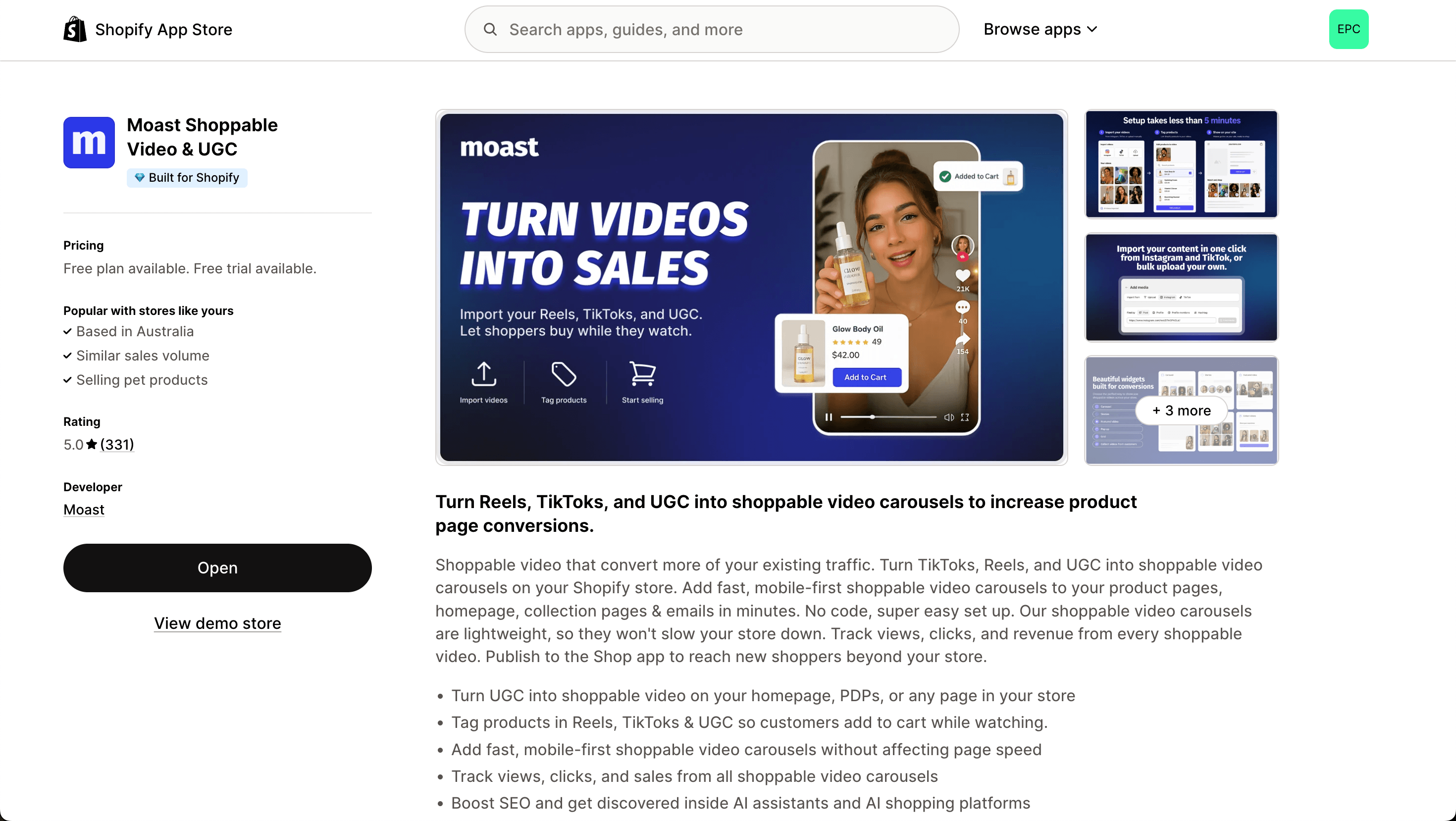
Moast's free plan includes product tagging, TikTok and Instagram URL import, the stories widget, and basic analytics, with up to 10 videos per widget and no cap on video views. That combination matters because product tagging is the mechanism that turns a view into an add to cart, and it is the feature most often withheld on competing free tiers.
Moast is Built for Shopify certified and rated 5.0 across 291 App Store reviews. The Pro plan is $15 per month flat, which adds unlimited videos, all widget types, automatic Social Sync from connected TikTok and Instagram accounts, branding removal, and full revenue attribution. There is no view metering on any plan.
Best for: stores that want a shoppable, tagged video widget live on product pages this week without a view ceiling hanging over it.
2. Video Slider by Doran: unlimited free views, one-time upgrade
Doran's Video Slider offers unlimited video views on its free plan and, unusually for this category, charges a single $49 one-time fee rather than a subscription for the paid version. It is Built for Shopify certified with a 4.9 rating across 325 reviews.
Best for: merchants who want to avoid a recurring app bill entirely and are comfortable with a simpler slider format.
3. Libautech Shoppable Videos UGC: free with no paid tier at all
Libautech's app has one plan, and it is free, with no view meter and no upgrade path to graduate to. It covers TikTok, Instagram, and YouTube import, product tagging, add to cart inside the video, Shop app publishing, and order attribution. It is Built for Shopify certified. The catch is track record: it carries 4 reviews against competitors with hundreds, which the vendor states plainly on its own comparison page.
Best for: merchants who prioritise cost certainty over a long public review history.
4. Reelfy: clean design on a video-count model
Reelfy meters on video volume rather than views. The free plan supports up to 10 total videos, the Starter plan is $9.99 per month for up to 25, and the Growth plan is $19.99 per month for up to 100. It is Built for Shopify certified with a 4.8 rating across 212 reviews.
Best for: brand-conscious stores with a small, curated video library.
5. Avada ShopVid: flat feature tiers with a low ceiling
Avada's Shoppable Videos Reels app runs a free plan with feature limits and a single paid tier at $12 per month. Because $12 is also the highest tier, there is no expensive step above it. It is Built for Shopify certified and rated 5.0 across 186 reviews.
Best for: merchants who want a predictable maximum spend from day one.
6. Videowise: enterprise feature set, modest published entry price
Videowise offers a free plan with feature limits and a published first paid tier of $9 per month, with enterprise pricing quoted on request. Real-world enterprise deployments run substantially higher; Whatmore's 2026 pricing comparison places platforms in this bracket well into the hundreds per month once traffic volume and white-labelling enter the picture. It is rated 4.9 across 218 reviews and does not display the Built for Shopify badge.
Best for: larger stores already planning for an enterprise contract.
7. Tolstoy: broad video toolkit, impression-gated at the top
Tolstoy runs a free plan with feature limits and a first paid tier of $19 per month, climbing toward $199 and above. Its higher tiers gate on monthly impressions, so cost tracks traffic once you move up. It is rated 4.7 across 235 reviews and does not carry the Built for Shopify badge.
Best for: teams that want quizzes, video landing pages, and shoppable video from one vendor.
8. Quinn: view-metered but cheap to lift
Quinn's free plan allows 550 video views per month, with a first paid tier of $9 per month and a top tier of $29 per month for 12,000 views. It is Built for Shopify certified and rated 4.9 across 105 reviews. The meter is the constraint, but the price to lift it is among the lowest in the category.
Best for: low-traffic stores testing whether shoppable video moves their numbers at all.
9. ReelUp: strong product, restrictive free tier
ReelUp is Built for Shopify certified and rated 5.0 across 282 reviews, so the product itself is well regarded. The free plan is the tightest on this list at 100 video views per month, and the meter scales steeply: the first paid tier is $29.99 per month and 50,000 monthly views costs $199.99.
Best for: merchants who have already validated demand and budgeted for a view-metered contract.
Also worth knowing: Whatmore's free plan allows 300 video clicks per month with a $29 first paid tier, PlayShorts allows 50 views and 150 impressions per month at $24, Storista starts paid at $15, SwipeUp at $29, and Reputon's YouTube gallery at $6.99. For a broader ranking that includes paid-first tools, see our guide to the best shoppable video apps for Shopify.

Spot the View Cap That Will Cost You Later
View metering is the single most common reason a free shoppable video plan stops being free. The arithmetic is worth doing before you install anything.
Take a Shopify store with 50,000 monthly sessions. If 40% of those sessions reach a product page carrying a video widget, and the widget loads for each of them, you are looking at roughly 20,000 video views per month. On a free plan capped at 100 views, you exhaust the allowance in a matter of hours. On a plan capped at 550, you last a day. On an uncapped plan, nothing happens at all.
The structural problem with view-based pricing is that it penalises the outcome you installed the app to produce. Every additional shopper who watches your video is a shopper closer to buying, and on a metered plan every one of them also increases your bill. Flat-tier pricing separates app cost from traffic volume, which is why it holds up better as a store grows.
Two things to check on the pricing page before committing:
- Is the meter counting views, impressions, or clicks? These are not interchangeable, and impressions are typically the largest number of the three.
- Does the flat monthly fee stay flat above a threshold, or does an overage charge appear once you cross it?
If you want to model this against your own numbers rather than a hypothetical, our guide to calculating the ROI of shoppable video walks through the inputs.
Get Measurable Revenue Without Paying for the App First
A free plan is only worth installing if the free features include the ones that actually move conversion. In practice that means three things: product tagging inside the video, placement on the product page rather than a standalone gallery page, and some form of analytics so you can tell whether it worked.
The results merchants report when those three are in place are substantial. Dame added shoppable video to their product pages and saw a $26,000 increase in monthly revenue and a $0.16 lift in revenue per visitor, without increasing traffic. ThruDark generated $5,854 in directly attributable sales in 30 days from a shoppable video carousel. ENDU moved monthly revenue from 307,000 euros to 345,000 euros on the same traffic after adding shoppable video reviews to product pages.
Those figures come from paid deployments, but the mechanism driving them, a tagged video on a product page, is available on free tiers that include product tagging. That is the specific feature worth checking for. An app that gives you unlimited free views but withholds tagging has given you a decorative element, not a sales tool. For the underlying evidence on why this works, see whether shoppable video actually increases conversions and our breakdown of how to increase Shopify PDP revenue with shoppable video.
Match the Free Plan to the Size of Your Store
The right free app depends almost entirely on your traffic and your video library. Three rough profiles cover most Shopify merchants.
Under 5,000 monthly sessions. Almost any free plan works at this volume, including the view-metered ones. Optimise for setup speed and for whether product tagging is included. Quinn's 550-view free tier and Reelfy's 10-video free tier are both viable here.
5,000 to 50,000 monthly sessions. This is where view meters start to bite. Prioritise an uncapped or video-count-limited free plan over a view-metered one, even if the metered app looks better on features. Moast, Video Slider, and Libautech all avoid view caps on free.
Above 50,000 monthly sessions. At this volume the free plan is a trial, not a destination. What matters is what the first paid tier costs when your traffic doubles. A $15 flat tier and a $29.99 metered tier are not comparable products, and the gap widens every month you grow.
One more filter worth applying regardless of size: the Built for Shopify badge. It is Shopify's own quality mark covering performance, design, and native integration, and it is a reasonable proxy for whether an app will slow your product pages down. Widget weight matters here, because a video app that adds hundreds of kilobytes to every product page is quietly taxing the same conversion rate it is meant to lift.
Launch Your First Free Shoppable Video This Week
Getting a free shoppable video widget live is a shorter project than most merchants expect. The sequence that works:
- Pick five to eight existing clips. You almost certainly already have them. Customer unboxings, TikToks, Reels, and product demos all work. You do not need to shoot anything new to start.
- Import by URL. Most apps on this list pull directly from a TikTok or Instagram URL, which avoids downloading and re-uploading files.
- Tag the product in every clip. This is the step that turns the widget into a revenue channel. Skip it and you have a video player.
- Place it on the product page, above the fold if the theme allows. Collection and homepage placements are useful, but the product page is where purchase intent already exists.
- Check the analytics after seven days. Look at video engagement and, if the app supports it, attributed revenue rather than raw view counts.
Our step-by-step guide to adding shoppable video to a Shopify store covers the mechanics in detail, and adding TikTok Reels to Shopify product pages covers the import path specifically.
If your video library is the bottleneck rather than the app, collecting free UGC from your existing customers is usually faster and cheaper than commissioning creator content.
Upgrade Only When the Free Plan Genuinely Runs Out
There are exactly four reasons to leave a free plan, and none of them is that the paid tier has more features.
You hit a hard cap. Views exhausted, video slots full, or a widget type you need is locked. This is a real constraint and worth paying to remove.
Branding is costing you credibility. On a premium product page, a third-party badge under a video reads as amateurish. If your average order value is high, removing it pays for itself quickly.
You need attribution to justify the channel internally. View counts do not survive contact with a finance conversation. Revenue attribution does. If you need to prove the channel works, you need the tier that reports on it.
Manual maintenance has become a job. Once you are uploading videos weekly by hand, automatic social sync stops being a luxury. This is usually the point where a $15 flat plan costs less than the labour it replaces.
If none of those apply, stay on free. A well-configured free plan with product tagging on the product page will outperform a badly configured paid one every time. For a longer view on where shoppable video fits alongside your other channels, see our guide to building a video commerce strategy for Shopify.

Frequently Asked Questions About Free Shoppable Video Apps
Is there a genuinely free shoppable video app for Shopify?
Yes, several. Moast's free plan includes product tagging, TikTok and Instagram import, the stories widget, and basic analytics with unlimited video views. Libautech has a single free plan with no paid tier and no view meter. Doran's Video Slider offers unlimited free views with an optional one-time upgrade rather than a subscription.
What is the catch with free shoppable video plans?
The catch is usually one of four things: a view or click meter, a limit on how many videos you can publish, a missing feature such as product tagging or branding removal, or a vendor badge displayed on your widget. Identify which gate applies before you install, because the gate determines how long free lasts for your specific traffic level.
Which free plan has the highest view limit?
Several apps place no cap on views at all on their free tier, including Moast, Libautech, and Doran's Video Slider. Among the metered options, Quinn is the most generous at 550 views per month, followed by Whatmore at 300 clicks and ReelUp at 100 views, based on figures compiled from live App Store listings in July 2026.
Do free shoppable video apps slow down a Shopify store?
They can, and widget weight varies significantly between apps. The Built for Shopify badge is a useful filter here because it requires apps to meet Shopify's performance standards. Check your product page load time before and after installing, and treat any meaningful regression as a reason to switch apps rather than to abandon shoppable video.
Can a free plan produce real revenue, or is it just a trial?
A free plan can produce real revenue as long as it includes product tagging and lets you place the widget on product pages. Those two features are what convert a view into an add to cart. Free plans that withhold tagging or restrict placement to a standalone gallery page function as trials rather than working tools.
Get started with Moast for free on the Shopify App Store
Related reading: Free shoppable video platform guide for Shopify · Shoppable video examples: 10 Shopify brands doing it right · 5 ways to add free UGC to your Shopify store
September 3, 2026
Related content
.jpg)

Turn your social content into a revenue channel
Turn your TikToks and Reels into shoppable videos and boost conversions by 3.5x.