

- The Honest Answer Upfront
- What the Broader Research Shows
- Real Shopify Brand Results
- Why Shoppable Video Converts Better Than Static Content
- The Placement Factor
- What Kind of Video Converts Best
- The Page Speed Question
- How to Measure Whether It's Working
- Common Reasons Shoppable Video Underperforms
- Frequently Asked Questions
The numbers on shoppable video are compelling. But what do they look like for real Shopify brands — and what actually drives the results?
The Honest Answer Upfront
Yes. Shoppable video increases conversion rates. The evidence is consistent across independent studies, controlled A/B tests, and the real-world results of Shopify brands using it right now.
But the more useful answer is: by how much, under what conditions, and what do you need to do to get there?
Because shoppable video is not a magic button. Dropping a video widget on your homepage and calling it done is not the same as placing authentic customer testimonials directly above the reviews section on your highest-traffic product pages. One is a decoration. The other is a conversion tool.
This post breaks down what the data actually shows — from industry research to specific Shopify brand results — and explains what separates the stores seeing meaningful lifts from the ones wondering why nothing changed.

What the Broader Research Shows
Let's start with the industry-wide numbers, because they give useful context before we get into the Shopify-specific results.
Independent A/B tests across ecommerce brands found that shoppable video lifts site-wide conversion rates by 17–33% on average, with top-quartile performers seeing 50% or more when placement and product tagging are optimised. These aren't vendor-pitched averages — they're controlled tests with 50/50 traffic splits run over 30 to 165 days across beauty, apparel, jewellery, and wellness brands.
The engagement numbers are equally striking: a 10–15% median engagement rate, with top performers hitting 25%+, and a 225% higher add-to-cart rate compared to static page visitors.
On the video marketing side, 78% of people say watching a video has convinced them to buy a product or service, and 87% prefer to learn about products through short video over any other format.
And from Wyzowl's 2025 State of Video Marketing report, 89% of consumers say a brand video has directly influenced a purchase decision. That's not a marginal effect — it's a near-universal one.
The mechanism is straightforward. Shoppable videos simplify the buying process by allowing shoppers to discover, learn about, and purchase products all in one integrated experience. By reducing the number of steps to make a purchase, these videos help minimise friction — resulting in more decisions being made and higher conversion rates.
Real Shopify Brand Results
Industry averages are useful for context. But what does this actually look like for Shopify merchants?
Dame: $26,000 more per month without increasing traffic
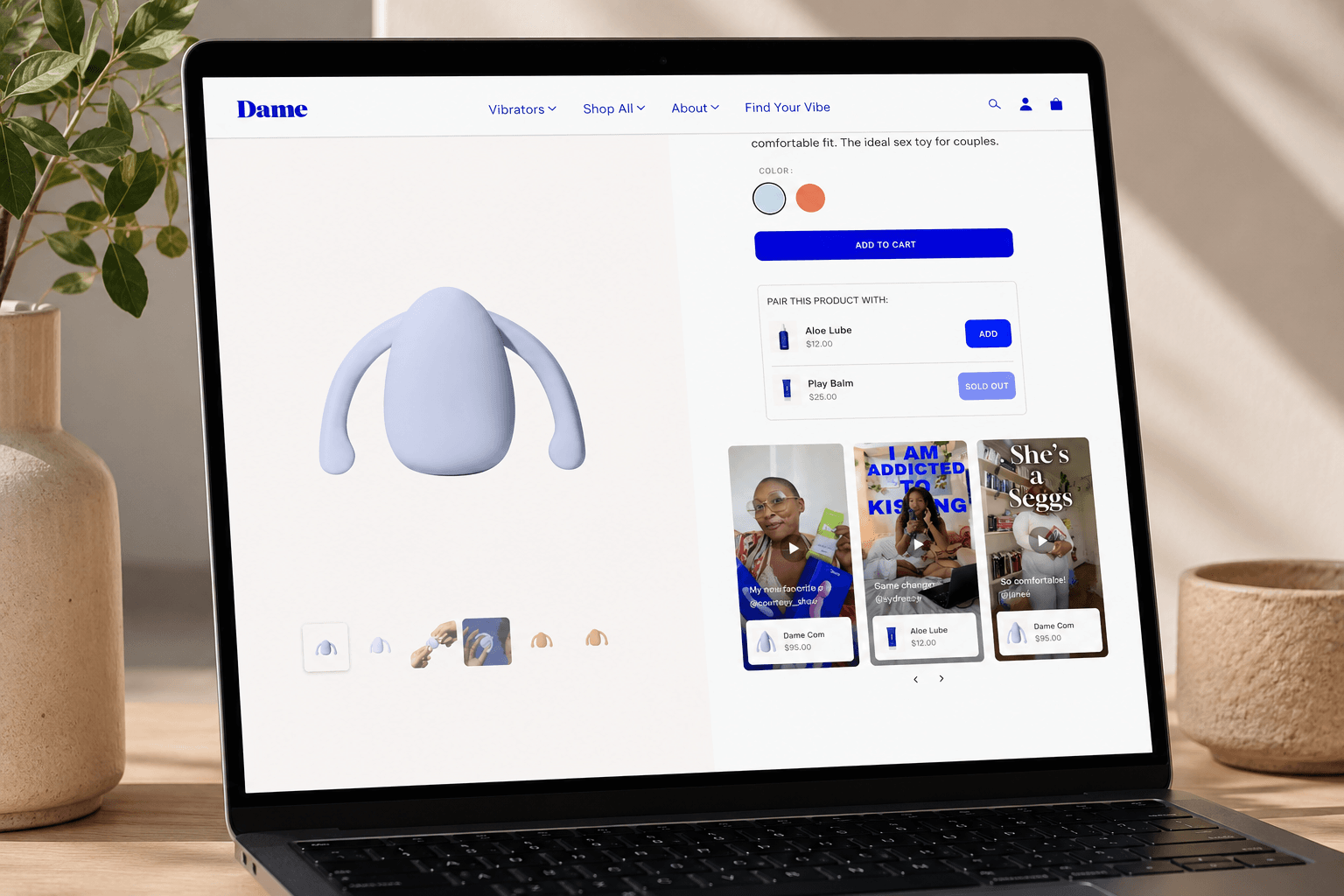
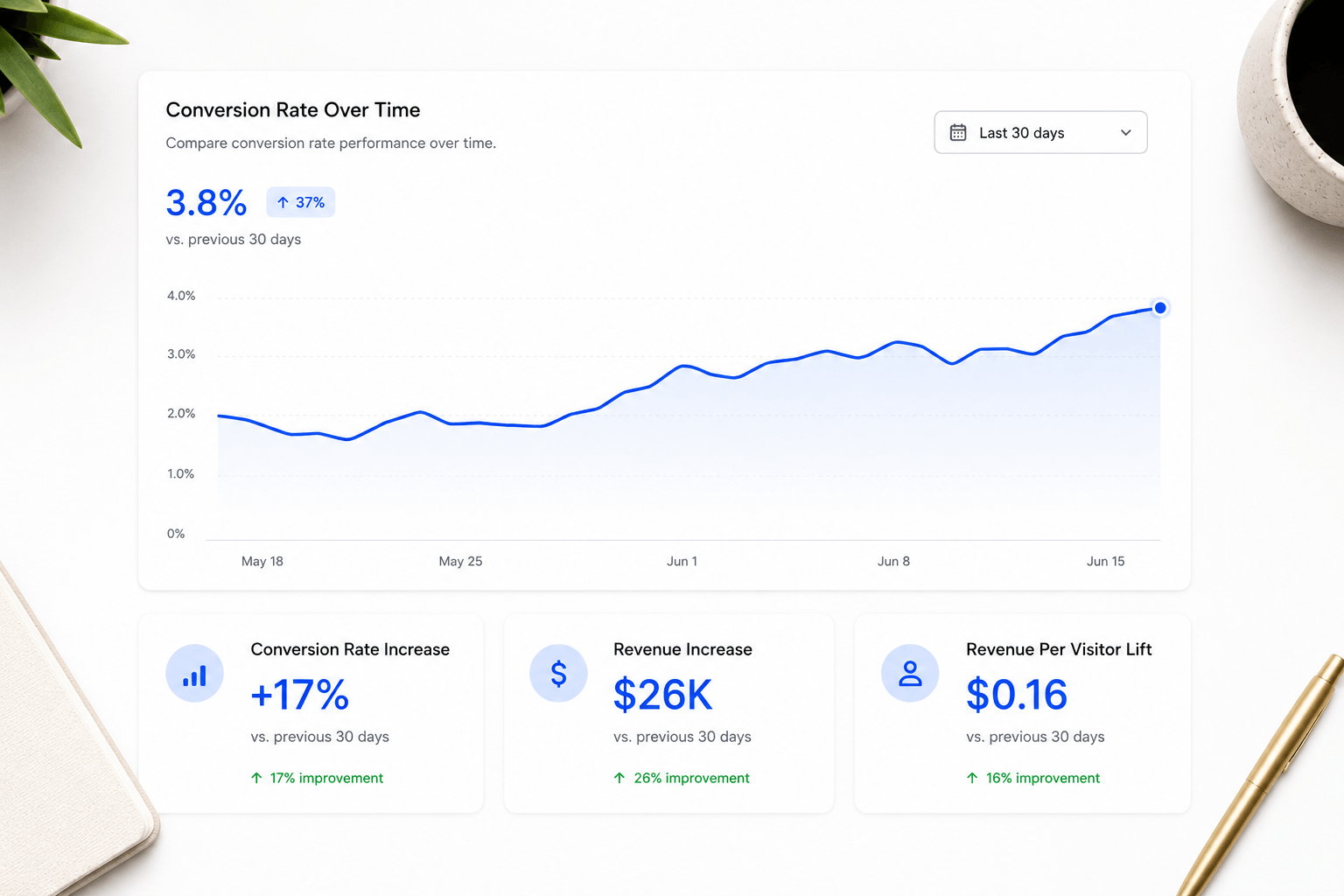
Dame, a Shopify brand, added Moast shoppable videos directly to their product pages. The results were measurable and direct: a $26,000 increase in monthly revenue, a 17% lift in conversion rate, and a $0.16 improvement in revenue per visitor — all without increasing ad spend or driving any additional traffic to the site.
The same visitors. The same products. Better-equipped product pages. That's the clearest possible demonstration of what shoppable video does to a purchase funnel — it makes the existing traffic more valuable.
ThruDark: $5,854 in attributable sales in 30 days
ThruDark makes premium performance apparel for people with demanding jobs and demanding standards. Their products are technical and premium-priced — exactly the category where customers need to see the product in action before they feel confident buying.
They placed a Moast shoppable video carousel directly above the reviews section on their product pages, using existing UGC and social content they already had. Within 30 days of going live: 293 videos live across their PDPs, 3,390+ monthly video views, and $5,854 in directly attributable sales. From content they already owned.
LNDR: 41,500 video views per month at predictable cost
LNDR, the athletic apparel brand, uses Moast across their product pages and averages 41,500 video views per month. With unlimited views on their plan, their cost stays flat as performance scales — meaning as their shoppable video drives more traffic and engagement, their margin on that investment only improves.
Why Shoppable Video Converts Better Than Static Content
Understanding why shoppable video works makes it easier to use it well. There are three core mechanisms at play.
1. It answers the questions photos can't
Static product photography is good at showing what something looks like. It's bad at showing how something moves, how it fits, how it feels, how it applies, how it compares in size to a real human body. For most physical products, those are exactly the questions that stand between a shopper and a purchase decision.
A video testimonial of someone wearing a jacket in the rain, showing how the zip works and how the hood fits, answers every question a cautious buyer might have. A flat-lay photo doesn't.
2. Customer video is trusted more than brand content
Research on consumer trust in UGC consistently shows that shoppers find user-generated content — customer reviews, customer videos, creator content — significantly more credible than polished brand-produced material. The figure cited most often is that UGC is 9x more trustworthy than brand content.
This matters specifically for video. A beautifully shot brand film showing your product in perfect conditions signals effort but also signals control. A customer's iPhone video showing them using your product in real life signals something a brand film never can: that a real person, with nothing to gain, thought your product was worth talking about.
3. It reduces the gap between discovery and purchase
The traditional ecommerce funnel forces shoppers to find a product, then find reassurance (reviews, social media, YouTube), then come back and buy. Shoppable video on a product page collapses that journey. The reassurance is right there, next to the add-to-cart button, with a product tag that makes buying a single tap away.
Shoppable video ads generate 3.2x more conversions than standard video ads — and the reason is exactly this. When the path from watching to buying is frictionless, more people take it.
The Placement Factor: Where You Put It Matters as Much as What It Is
This is the variable most merchants underestimate. The same video placed in different positions on the same page can produce dramatically different results.
The highest-converting placement for shoppable video on a Shopify product page is directly above the reviews section. Here's why: that's where shoppers go when they're close to buying but not quite there yet. They've seen the product, they're interested, and now they're looking for confirmation. Reviews are that confirmation — and shoppable video placed directly above them gives them richer, more credible confirmation before they even read a single written review.
ThruDark uses exactly this placement. Their Moast carousel sits directly above their reviews section on every PDP, and the combination of video social proof followed immediately by written reviews creates a layered trust-building experience that their conversion data reflects.
The second-best placement is below the add-to-cart button. This captures shoppers who scrolled past without buying on first pass — giving them one more reason to reconsider before they leave the page.
What doesn't work as well: video buried at the bottom of the page, video only on the homepage, video on collection pages without PDP placement. These placements have value but they're not where purchase decisions happen.
What Kind of Video Converts Best?
Not all video content performs equally. Based on the data from real Shopify brands and broader ecommerce research, here's what separates high-converting video from low-converting video.
Authentic UGC outperforms polished brand video on product pages. This is consistent and well-documented. Customer testimonials, creator content, and user-submitted videos convert better than professionally shot brand films when placed on product pages. The reason is trust: shoppers know a customer video is unscripted, and that authenticity is more persuasive than production quality.
Short-form content (15–60 seconds) works best for mobile. Most Shopify traffic is mobile. Videos that get to the point quickly — showing the product, demonstrating a benefit, sharing a result — outperform longer content in mobile contexts. If you have longer videos, the first 15 seconds need to hook the viewer immediately.
Content with product tags converts better than content without. This sounds obvious but gets skipped. A video without a product tag is just a video. It may build trust, but it doesn't directly drive add-to-carts. Every video on your product pages should be tagged. Importing from TikTok and Instagram and adding tags during import is the fastest way to build a properly tagged library.
The Page Speed Question
One concern merchants raise consistently before adding video to their product pages: will it slow down my store?
It's a legitimate question. Page speed directly affects both conversion rates and SEO. Google's own data shows that a one-second delay in mobile load time reduces conversions by up to 20%.
The answer is: it depends entirely on which app you use. Some shoppable video apps are significantly heavier than others. An unoptimised video embed can add seconds to your load time and meaningfully hurt your Core Web Vitals scores.
Well-engineered apps are designed specifically to avoid this. Moast's widget is 6KB — the total page load impact is just 0.85MB — which has essentially zero measurable effect on page speed. The right app gives you the conversion benefits of shoppable video without the performance cost.
Before and after adding any video widget, run a Google PageSpeed Insights test. If your score drops meaningfully, the app you're using isn't well-optimised for Shopify.
How to Measure Whether It's Working for Your Store
The industry averages and brand case studies above give you a benchmark. But your store is specific — your product, your customers, your existing conversion rate, your traffic profile. Here's how to measure impact directly.
Set a baseline first. Before adding shoppable video to a product page, record the current conversion rate, add-to-cart rate, and revenue per visitor on that page. Do this for 2–4 weeks to get a stable baseline. Then add the video widget and measure the same metrics over the same period.
Track the metrics that matter:
- Video views — are people actually watching? Low views usually mean placement (too far down the page) or thumbnail (first frame isn't compelling)
- Click-through on product tags — what percentage of viewers are clicking through to the product page? This measures how well the content is connecting with buying intent
- Add-to-cart from video — direct revenue signal. A good shoppable video analytics dashboard shows this at the individual video level
- Revenue per visitor on pages with video vs without — the cleanest measure of overall impact. Dame's $0.16 RPV lift is a real-world benchmark for what this looks like
Give it enough time. Four weeks is the minimum for meaningful data. Seasonal effects, traffic fluctuations, and natural variance can all distort shorter windows.
Iterate based on what you find. If one video is driving significantly more add-to-carts than others, promote it to the highest-visibility slot. If a widget isn't getting views, move it higher on the page. Treat shoppable video like any other CRO experiment — test, measure, improve.
Common Reasons Shoppable Video Underperforms
If you've tried shoppable video and not seen the results you expected, one of these is usually the reason.
- Wrong placement. Video on the homepage or buried below the fold on a product page won't produce PDP conversion results. It needs to be where buying decisions happen — above the reviews section, in the purchase consideration zone.
- No product tags. Video without product tags builds awareness but doesn't directly convert. Every video on a product page should be tagged.
- Wrong content type. Highly produced brand video on a product page performs worse than authentic customer content. If everything in your widget looks like an ad, shoppers will treat it like one.
- Too many mediocre videos. A carousel with 20 average videos performs worse than one with 5 great ones. Curate your library ruthlessly. The best four to six videos should lead every widget.
- Measuring too early. Two weeks of data is not enough to conclude that shoppable video doesn't work. Give it a full month with a clean baseline before drawing conclusions.
- A slow app. If the video widget is adding significant load time, the performance cost may be eroding the conversion gain. Check your PageSpeed scores.
Frequently Asked Questions
Does shoppable video increase conversion rates on Shopify?
Yes. Independent A/B tests show site-wide conversion rate lifts of 17–33% on average for ecommerce brands adding shoppable video to product pages. Moast merchants see an average 17% lift in conversion rate. Dame, a Shopify brand, saw a $26,000 increase in monthly revenue and a 17% conversion rate lift after adding shoppable video to their PDPs — without any increase in traffic.
How long does it take to see results from shoppable video?
Most merchants start seeing measurable impact within 2–4 weeks of going live. ThruDark saw $5,854 in attributable sales within their first 30 days. Give your test at least one full month with a stable baseline before drawing firm conclusions.
What kind of video performs best on Shopify product pages?
Authentic customer video — TikTok content, Instagram Reels, customer-submitted testimonials — consistently outperforms polished brand video on product pages. Short-form content (15–30 seconds) works best for mobile. Every video should have product tags so shoppers can click directly from the video to the product or cart.
Does adding video slow down my Shopify store?
It depends entirely on the app. Poorly optimised video embeds can hurt your page speed and Core Web Vitals scores. Well-engineered apps like Moast are designed to have minimal footprint — Moast's total page load impact is 0.85MB, with essentially zero effect on performance. Always run a PageSpeed test before and after adding any video widget.
Where should I put shoppable video on my Shopify product page?
Directly above the reviews section is the highest-converting placement. That's where shoppers look for social proof when they're close to buying. Below the add-to-cart button is also effective for recovering shoppers who didn't convert on first pass.
Do I need to create new videos to get started?
No. Most merchants have existing content on TikTok and Instagram that can be imported directly. You can import TikTok and Instagram Reels into your Shopify store by pasting a URL — no downloading, no re-uploading. Five to ten well-tagged videos placed on your top PDPs is enough to start generating meaningful data.
The data is clear and consistent: shoppable video on product pages increases conversion rates, increases revenue per visitor, and makes existing traffic more valuable. The question for any Shopify merchant isn't whether it works — it's whether your product pages are equipped with it yet.
The good news is that getting started is faster and cheaper than most merchants expect. The content you already have — on Instagram, on TikTok, in your customer's hands — is more valuable than you think. It just needs to be in the right place.
Get started with Moast for free
Related reading: How to add shoppable video to your Shopify store · How to add video testimonials to your Shopify product pages · Best shoppable video apps for Shopify in 2026
October 12, 2026
Related content


.jpg)
Turn your social content into a revenue channel
Turn your TikToks and Reels into shoppable videos and boost conversions by 3.5x.