
The Moast + Kaching integration shows your Kaching subscription and bundle offers inside the quick add panel of your shoppable videos. Shoppers watch a customer video, open quick add, and see your Subscribe and Save or bundle discount right under the variant picker. One toggle in Moast settings turns it on, with no code and no per-widget setup.
Moast, a Shopify-native shoppable video UGC app, plays your existing Reels, TikToks, and customer videos on your product pages and lets shoppers add to cart without leaving the video. Kaching builds two of the highest rated offer apps on the Shopify App Store. Connect the two and the moment a video convinces someone becomes the moment they see your best offer. This guide covers why that pairing works, the exact setup steps with real screenshots, and how to measure the results.
Why show Kaching offers inside shoppable video
Shoppable video and subscription offers solve two different problems. Video builds the conviction to buy. Offers decide how much the order is worth and whether it repeats. Most stores keep them apart: the video plays on the product page while the Subscribe and Save widget sits further down, hoping the shopper scrolls back to find it.
The integration closes that gap. When a shopper taps a product in a Moast video, the quick add panel opens with the Kaching offer already in view. The discount appears at the exact moment a real customer's video has done the convincing, which is the highest intent moment that shopper will have on your site. That matters for two numbers every DTC operator watches:
- Lifetime value. A shopper who picks Subscribe and Save 25% off instead of a one-time purchase is worth a multiple of that first order. Surfacing the subscription option inside quick add means every video viewer sees it, not just the ones who scroll the full product page.
- Average order value. Kaching bundle offers show in the same picker, so the shopper who came for one unit sees the two-pack or three-pack discount before checkout, not after.
The intent is already there. Across the 6,080 stores running Moast, 21.1% of product page visitors play a video when one is available, per Moast network data. Our roundup of video commerce statistics and our breakdown of whether shoppable video increases conversion cover what that attention does to buying behavior. The short version: sports nutrition brand ENDU grew from 307,000 to 345,000 euros on the same 100,000 visitors after adding shoppable video. The integration exists so offers can compound that effect instead of sitting outside it. For the broader playbook, see how to increase Shopify PDP revenue with shoppable video.
What is Kaching?
Kaching is the developer behind two offer apps that both carry Shopify's Built for Shopify badge, Shopify's standard for apps that meet its performance and quality bar. As of November 20, 2026:
- Kaching Subscriptions holds a 5.0 star rating across 1,235 reviews. It launched in June 2025 and runs Subscribe and Save offers, with plans starting at $9.99 per month and free use on development stores.
- Kaching Bundles holds a 5.0 star rating across 6,796 reviews. It powers quantity breaks and bundle deals, with plans from $14.99 to $59.99 per month, and its tiers are capped by the additional revenue the app generates for you.
If you already run either app, the integration costs nothing extra on either side. If you run neither, the subscription app is the natural starting point for consumables and the bundle app for everything bought in multiples.
What the integration does
Moast's quick add panel is the mini product page that opens when a shopper taps a product inside a video. It shows the variant options, price, and add to cart button. With the integration on, the panel also shows Kaching's offer picker directly under the variant options. The shopper picks an offer, taps add to cart, and the item lands in the cart with the Kaching discount already applied.
Worth separating from what Moast does out of the box: products that have any Shopify subscription plan already show One-time purchase and Subscribe choices in quick add with no setup at all. The Kaching integration adds Kaching's own offer picker on top of that, including bundle offers, with Kaching's exact discount math and labels.
Two honest limits. Moast reads your Kaching offers, it does not create them, so a product with no offer in Kaching shows a standard quick add panel. And the integration lives in the quick add panel specifically; it does not change how Kaching renders on your product pages, which keeps the two apps from stepping on each other.
How to set up the integration in Moast
Setup is five steps and takes about two minutes. The full walkthrough also lives in our Moast + Kaching help article.
- Create your offers in Kaching first. Moast shows what exists in your Kaching account. If a product has no offer, nothing new appears for it.
- Open Integrations in Moast. In the Moast app, go to Settings, then Integrations. You will see the Kaching card alongside Shop app, Klaviyo, and Judge.me.
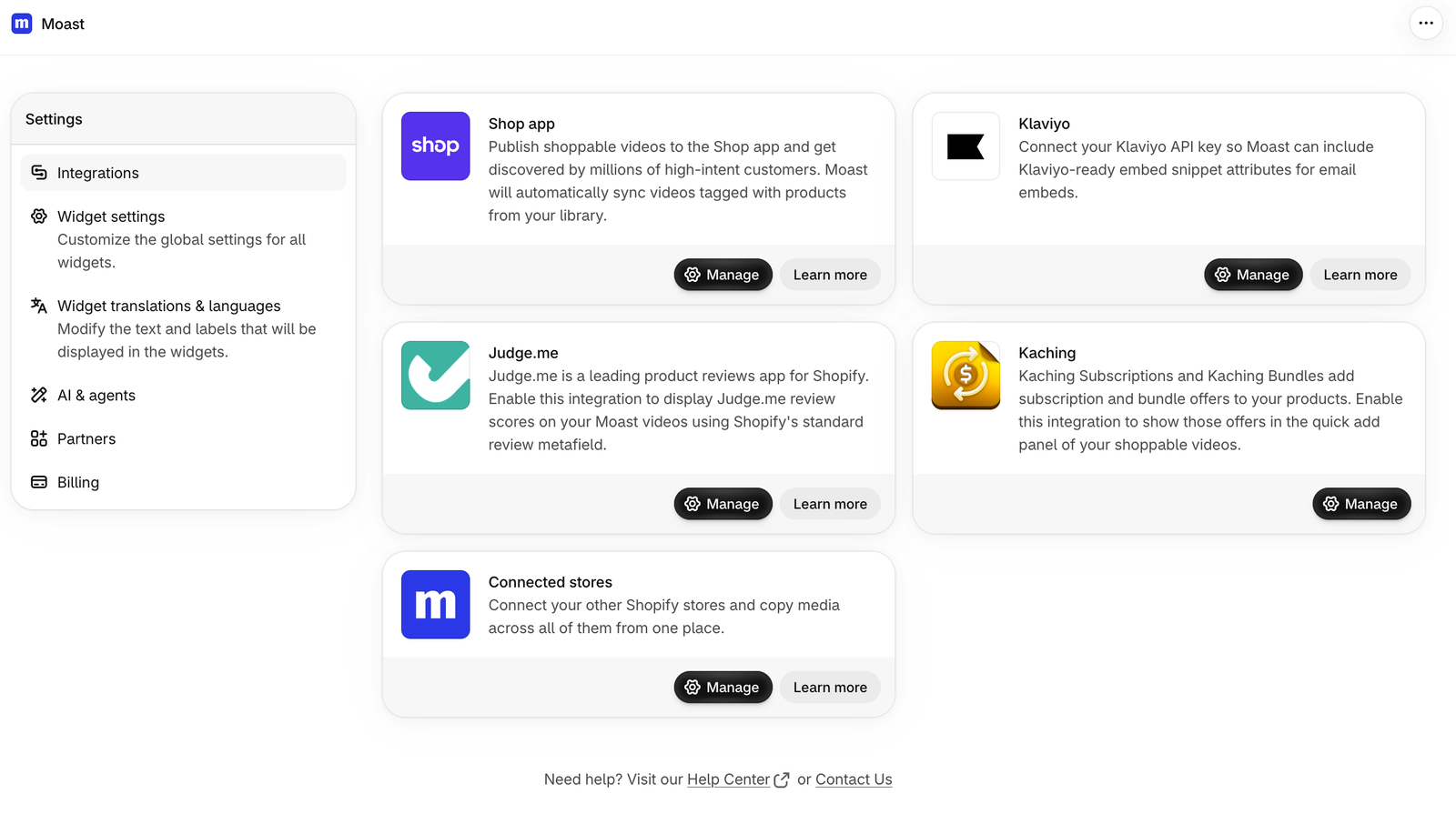
- Click Manage on the Kaching card. This opens the Kaching integration page.
- Grant access if prompted. If Shopify asks to allow Moast to read subscription plans, click Grant access. This is a read permission; Moast never edits your Kaching offers.
- Turn on the toggle and save. Switch on Show Kaching offers in quick add, then click Save.
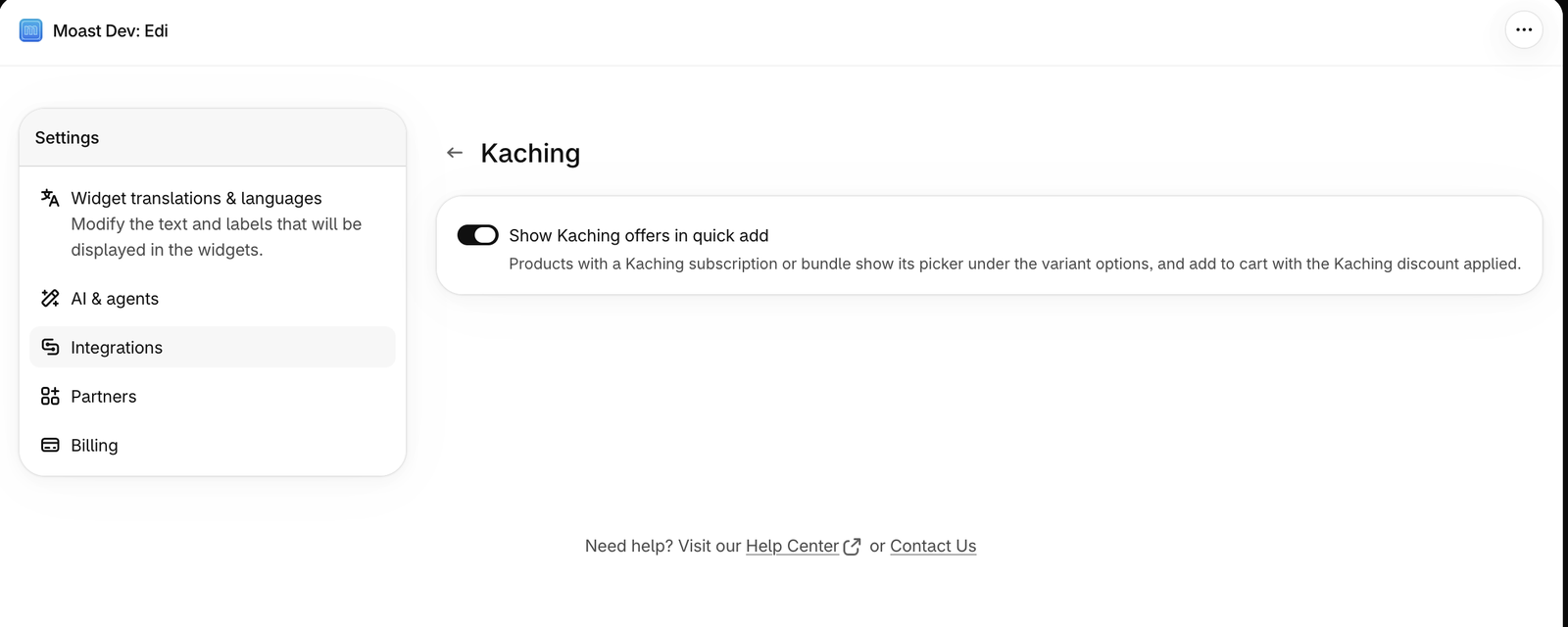
That is the entire setup. Every Moast widget on your store picks it up automatically, whether the video sits on a product page, the homepage, or a landing page. If you are still getting videos live, start with how to add shoppable video to Shopify.
What shoppers see in the quick add panel
Here is the result on a storefront. The shopper opened a serum product from a video, and the quick add panel offers One-time purchase at $22.00 or Subscribe and Save 25% off at $16.50, with the subscription terms spelled out before checkout.
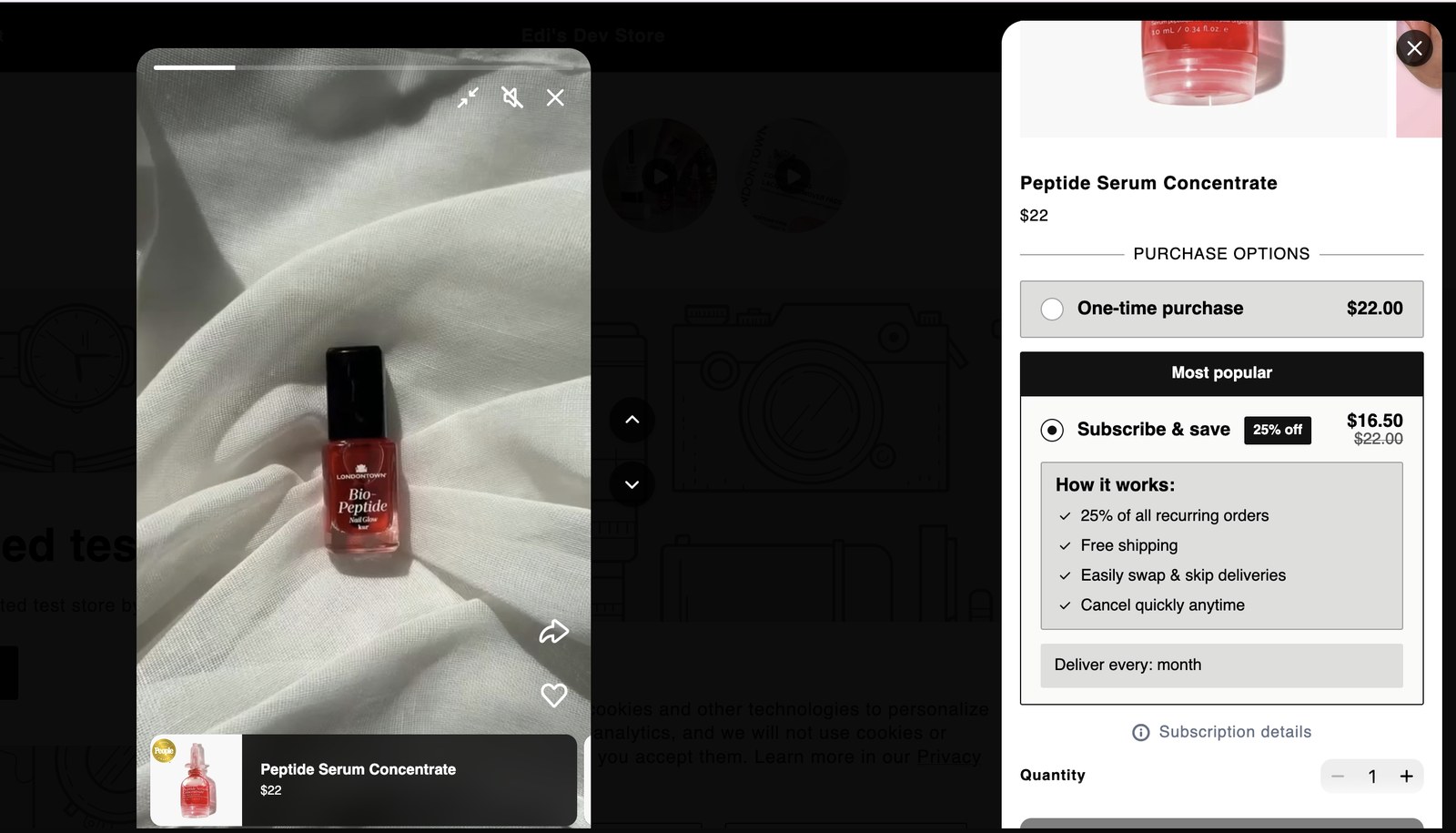
The picker uses Kaching's discount math and your product's real pricing, so what shoppers see here always matches what they would see in your Kaching-powered product page widgets. One decision, made at the moment of highest intent.
How to measure the revenue impact
Moast's analytics already attribute plays, add to carts, and revenue to each video. After turning the integration on, three checks tell you whether it is working:
- Subscription share of video-attributed orders. Compare the two weeks before and after enabling the toggle. If video viewers are seeing the offer, the subscription share of those orders should climb.
- Revenue per visitor on video pages. RPV captures both conversion and order value in one number. Dame, for reference, attributes $26,000 in monthly revenue to shoppable video at $0.16 revenue per visitor.
- AOV on bundle-eligible products. If you run Kaching Bundles, watch whether video-attributed orders start carrying multi-unit quantities.
Our guide to calculating the ROI of shoppable video walks through the math. And if you want more subscription-ready content to feed the loop, Moast's Smile.io integration rewards customers with points for submitting videos, which keeps fresh UGC flowing to the videos that now carry your offers.
Frequently asked questions
Does the Moast + Kaching integration cost extra?
No. The integration is included in both apps; you only pay each app's own plan. Moast has a free plan with unlimited video views and a Pro plan at a flat $15 per month, and Kaching Subscriptions starts at $9.99 per month as of November 20, 2026.
Do I need both Kaching apps for the integration to work?
No. Moast shows whatever offers exist in your Kaching account, whether they come from Kaching Subscriptions, Kaching Bundles, or both.
Why are my Kaching offers not showing in quick add?
The most common reason is that the product has no offer in Kaching. Moast reads offers, it does not create them. If the offer exists, confirm the Show Kaching offers in quick add toggle is on in Settings, then Integrations, then Kaching, and that you granted Moast access to read subscription plans.
Does this replace Shopify's native subscription options in quick add?
No. Products with any Shopify subscription plan already show One-time purchase and Subscribe choices in quick add with no setup. The integration adds Kaching's own offer picker, including bundles, alongside that.
Where do shoppers see the Kaching offers?
Inside the quick add panel of any Moast shoppable video, directly under the variant options. Product page widgets from Kaching are untouched.
Put your best offer inside your best content
Your customer videos already carry the proof. The integration makes sure the offer is standing next to it. If you are new to the format, our explainer on what shoppable video is is the place to start. If you are ready to run it, try Moast free with unlimited video views, connect Kaching, and flip the toggle.
November 20, 2026
Related content


Turn your social content into a revenue channel
Turn your TikToks and Reels into shoppable videos and boost conversions by 3.5x.