
AI and Search Engine Visibility
Updated 2 days ago
What is AI and Search Engine Visibility
This integration helps your video content get found beyond your website.
Search engines can't watch videos. AI shopping assistants don't know what your videos show. This integration fixes both. It adds structured data to your store so Google, ChatGPT, Gemini, and other AI tools can read, understand, and surface your video content.
Why this matters
Shoppers are increasingly finding products through AI assistants and search, not just by visiting stores directly.
Get your videos indexed in Google search results, including rich video snippets
Let AI shopping agents discover and recommend your products
Give LLMs the context they need to understand your video content
Reuse the videos you already have, no extra work needed
Fully automatic after a one-time setup
Tag your videos once, and they work everywhere.
How it works
When this integration is on, Moast analyzes your videos automatically. For each one, it generates:
A short title that describes what the video actually shows (e.g., "New Arrivals Unboxing")
A 1-2 sentence description written in context of your store and products
If a video has tagged products, Moast also generates a product-level description that ties the video directly to that item.
All of this gets written into your store pages as structured VideoObject data, the format that search engines and AI tools are built to read.
When enabled, Moast automatically:
Analyzes every eligible video using AI
Generates titles and descriptions based on what's actually in the video
Embeds structured VideoObject schema on your store pages
Syncs product metafields so AI agents can read your content via Shopify's Universal Commerce Protocol (UCP)
Keeps everything updated as you add or change videos
Once it's on, there's nothing to configure, write, or maintain.
How to turn it on
There are two features inside this setting. We recommend enabling both.
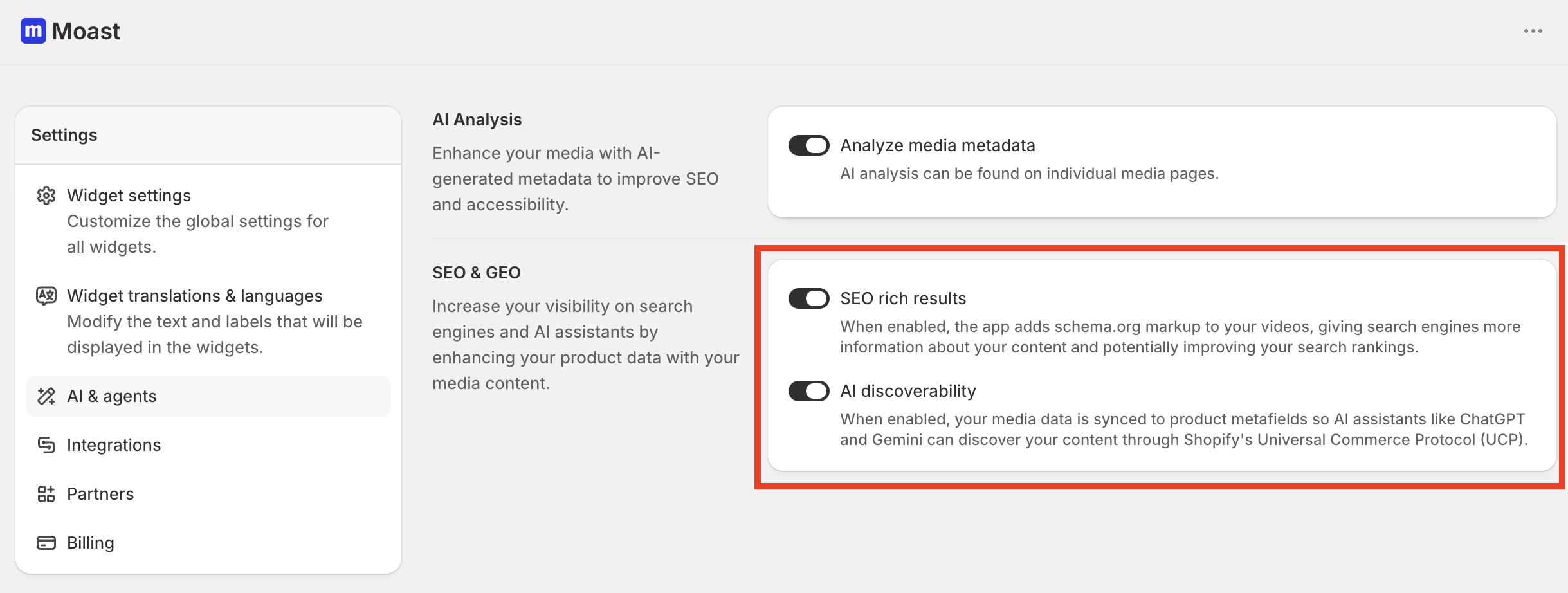
1: Turn on SEO rich results
This adds schema.org markup to your videos so search engines can index them, improving your search rankings.
Open AI visibility in the Moast dashboard menu
Toggle on SEO rich results
Once enabled, search engines will have structured data for every video on your store pages, which can improve rankings and unlock rich video snippets in search results.
After you turn the toggle on, Moast shows a status under it. A Synced badge with a count, like 3 products synced for rich results, means your products have eligible videos.
If you see Waiting for media instead, tag media to your products to start syncing. A product counts when it gets videos through its product feed, or when videos are tagged directly to it and it has no product feed. Only videos that are ready to stream and shown in widgets count toward the total.
2: Turn on AI discoverability
This syncs your media data to product metafields so AI assistants can find your content.
Open AI visibility in the Moast dashboard menu
Toggle on AI discoverability
This uses Shopify's Universal Commerce Protocol (UCP) so tools like ChatGPT and Gemini can discover and reference your videos when shoppers ask about your products.
That's it. Both features work automatically from the moment they're enabled.
3: Track AI citations (beta, early access only)
AI citations shows whether AI assistants mention your store or link to it when they answer shopping questions. It lives in AI visibility: open AI citations in the menu.
You choose the questions to track: pick Moast's suggestions or write your own, up to the limit set for your store. The page shows how many you're tracking.
Each question is asked once a month. Moast records whether the assistant mentioned or linked to your store, which of your products it cited, and which competitors came up.
When citations are on, the AI visibility overview adds Mentioned by AI and Links to your store metrics.
Citations aren't on for every store yet. If you don't see AI citations in AI visibility and you're on the Pro plan, you can request early access from the AI visibility overview. See Track AI citations for the full walkthrough.